
Angular’s piping mechanism is something Angular developers use everyday. There’s an excellent article that explores pipes in depth, and the gist of the article is the following:
When pipe is pure,
transform()method is invoked only when its input arguments change. Pipes are pure by default.
If the pipe has internal state (that is, the result depends on the state other than its arguments), setpuretofalse. In this case, the pipe is invoked on each change detection cycle, even if the arguments have not changed.
Another interesting feature of the pure pipes is that Angular creates only one instance of a pure pipe regardless of how many times a pipe is used in a template:
<span [text]=”value | myCustomPurePipe”>
<span [text]=”value | myCustomPurePipe”>
Here only one instance of myCustomPurePipe should be created.
This was true before Ivy, and in this article I’m going to take a look under the hood to find out if this still holds true in Ivy.
Setting things up
First thing first, let’s create a new Angular project with version ≥ 9, because we are exploring pipes in Ivy implementation.
ng new study-pipes --style css --skip-tests true --routing false
cd study-pipes
Create a custom pure and an impure pipe
Next we will create a custom pipe named my-custom-pure-pipe and my-custom-impure-pipe:
ng g pipe my-custom-pure-pipe --skip-tests true
ng g pipe my-custom-impure-pipe --skip-tests true
Then, change the implementation of my-custom-pure-pipe like this:
@Pipe({
  name: 'myCustomPurePipe',
  pure: true
})
export class MyCustomPurePipe implements PipeTransform {

  constructor() {
    console.log('MyCustomPurePipe created');
  }

  transform(value: number, ...args: any[]): any {
    console.log(`MyCustomPurePipe#transform called, value ${value}`);
    return value;
  }

}
And change my-custom-impure-pipe like this:
@Pipe({
  name: 'myCustomImpurePipe',
  pure: false
})
export class MyCustomImpurePipe implements PipeTransform {

  constructor() {
    console.log('MyCustomImpurePipe created');
  }

  transform(value: number, ...args: any[]): any {
    console.log(`MyCustomImpurePipe#transform called, value ${value}`);
    return value + value;
  }
}
Basically here we’re just logging at the instance creation stage and when the transform is called by Angular during change detection.
In app.component.ts, change the code as below:
@Component({
  selector: 'app-root',
  templateUrl: './app.component.html',
  styleUrls: ['./app.component.css']
})
export class AppComponent {
  number1 = 1;
  number2 = 2;
}
And in angular.json file, change aot option at projects -> study-pipes -> architect -> build -> options -> aot from true to false to disable ahead of time (AOT) compilation. This will allow us to explore the generated code more easily.
Now we’re finished with setting up the project. Let’s start our exploration journey.
Exploring Pipes
Suppose in the app.component.html we have the following template
<span>{{ number1 | myCustomPurePipe }}</span>
<span>{{ number2 | myCustomPurePipe }}</span>
<span>{{ number1 | myCustomImpurePipe }}</span>
<span>{{ number2 | myCustomImpurePipe }}</span>
Let’s open the Chrome dev tools, in Source tab, and navigate to app component file, you will see this code:
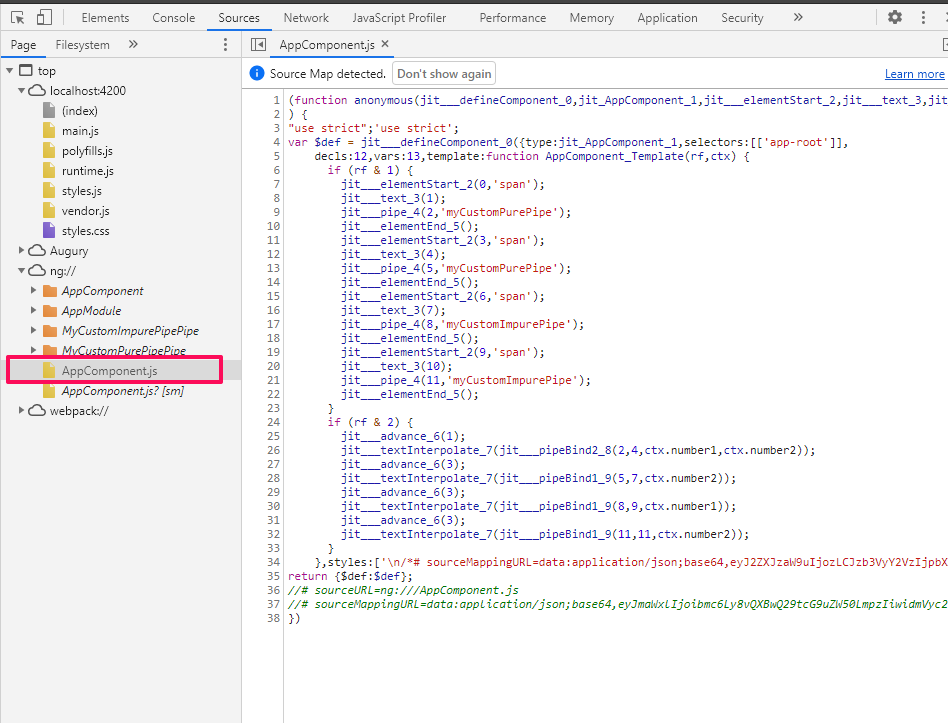
There are two main if blocks in the generated code inside AppComponent_Template: the code executed during component instantiation rf & 1 and change detection logic rf & 2.
Here is the creation block:
  if (rf & 1) { // this is the creation phase
    jit___elementStart_2(0,'span');
    jit___text_3(1);
    jit___pipe_4(2,'myCustomPurePipe'); // pipe instance is created
    jit___elementEnd_5();
    jit___elementStart_2(3,'span');
    jit___text_3(4);
    jit___pipe_4(5,'myCustomPurePipe'); // pipe instance is created
    jit___elementEnd_5();
    jit___elementStart_2(6,'span');
    jit___text_3(7);
    jit___pipe_4(8,'myCustomImpurePipe'); // pipe instance is created
    jit___elementEnd_5();
    jit___elementStart_2(9,'span');
    jit___text_3(10);
    jit___pipe_4(11,'myCustomImpurePipe'); // pipe instance is created
    jit___elementEnd_5();
The jit__pipe_4 is actually the function to create a new instance of a pipe. So you can see that we’ll have 4 instances of pipes. It means that in Ivy every pipe has its own instance, be it a pure or impure pipe. Whereas in View Engine, pure pipe has a shared instance.
Let’s now look at the change detection block:
if (rf & 2) {
        jit___advance_6(1);
        jit___textInterpolate_7(jit___pipeBind1_8(2,4,ctx.number1));
        jit___advance_6(3);
        jit___textInterpolate_7(jit___pipeBind1_8(5,6,ctx.number2));
        jit___advance_6(3);
        jit___textInterpolate_7(jit___pipeBind1_8(8,8,ctx.number1));
        jit___advance_6(3);
        jit___textInterpolate_7(jit___pipeBind1_8(11,10,ctx.number2));
      }
The jit___pipeBind1_8 is the function to call transform on a pipe.
Here’s the code when the pipe does the transform task.
// this code is called in update phase, or when change detection runs
export function ɵɵpipeBind1(index: number, slotOffset: number, v1: any): any {
  const adjustedIndex = index + HEADER_OFFSET;
  // get LView, LView stands for Logical View
  const lView = getLView();

  // get pipeInstance from LView
  const pipeInstance = load<PipeTransform>(lView, adjustedIndex);

  return unwrapValue(
      lView,
      // whether pipe is pure
      isPure(lView, adjustedIndex) ?
          // call pipe’s transform method or return from cache value
          pureFunction1Internal(
              lView, getBindingRoot(), slotOffset, pipeInstance.transform, v1, pipeInstance) :
          // pipe is impure then call pipe’s transform method directly
          pipeInstance.transform(v1));
}
From the above code, the isPure method will check whether a pipe is pure or impure by looking at the pure property in @Pipe decorator.
For impure pipes Angular calls the transform method on every change detection. For any input change to the pure pipe, it will call transform function. Otherwise it will return a cached value.
Conclusion
So, to conclude:
- In Ivy, every pipe has its own instance, be it a pure or impure pipe. Whereas in View Engine, pure pipe has a shared instance. For example, in Ivy, if I use
myCustomPurePipein two places in a template, then, two instances ofMyCustomPurePipeare created. - In a component which uses Default change detection strategy, when change detection happens, if the pipe is impure, then the
transformmethod will be called. If the pipe is pure, whether there are any changes in input parameters in thetransformmethod from the last call, then transform method will be called. Otherwise the pipe will return the cached value from last transform call. - When using impure pipe
async, you should use it together with OnPush change detection to avoid unnecessary calls totransformon every change detection.
Here are two StackBlitz repos for you to play around, one is for View Engine, and another is for Ivy.
Thanks for your time and happy coding!