
In this article I am going to cover a fun hands-on example to see some Tree shaking happening within the Angular framework code. I will briefly explain the tree-shakable concept (in-context with Ivy) and how does Ivy achieves it and then jump into an example.
First, let’s understand a few key terms and I will also include references to articles if you need a deeper understanding of these concepts:
- Ivy — It is the code name for Angular’s next-generation compilation and rendering pipeline. Read here and for in-depth functioning and reasoning, check this article out.
- Tree shake — Popular term used to refer to a step during the build process where unused code is not included in the bundle, making the overall bundle smaller.
So, why Ivy?
I am sure most of us have come across articles, blogs comparing the final bundle (compiled JS) sizes of a Hello-World or ToDo app written in modern JS frameworks/libraries and would notice that an app written in Angular would relatively have bigger bundle size. The bundle size was definitely a cause of concern, especially when we are moving towards mobile-first and high-performance apps. We know that the Angular framework consists of many libraries such as i18n, Http, router, animations, etc. and before Ivy, the Angular renderer (ViewEngine) itself was not tree-shakable. So the entire ViewEngine renderer was being shipped to the browser and was contributing towards the bundle size. The idea of reducing the framework size itself by not including the unused code in the final bundle and also making the renderer tree-shakable led to the new default compiler and renderer mechanism known as Ivy.
How Ivy is able to tree-shake code from the Angular framework itself?
Ivy runtime is based on the concept of Incremental DOM and generates a series of instructions to update the DOM trees. Ivy generates these instructions (Template Instructions) by going through the Template code that you have written and these instructions are self-sufficient to create/update DOM without the need of any Angular Interpreter. This means that you do not need to bundle the entire Angular Interpreter code in the final generated bundle file, or in other words, using these template instructions set, you are only generating code (in the final bundle) that you need from the template, that you have written.
For example, if you do not use Pipe in your template, there won’t be an instruction set (in compiled JS) related to CreatePipe() and hence that code can easily be tree shaken from Angular Core code by tools such as WebPack or Rollup, etc.
Tree-shaking in action
This section is inspired by Kara’s talk, where she goes over to show how Ivy was able to tree-shake all the unused instruction methods from the renderer and only include methods that were required by the template that we have written. I was curious to try myself, so here we go:
Let’s create a new Angular 9 app using the Angular CLI and let’s call it helloApp. Source code for this example can be found here.
ng new helloAppMake sure that you are using Angular 9 and above by going through package.json file. If not, please update the app by following the update guide.
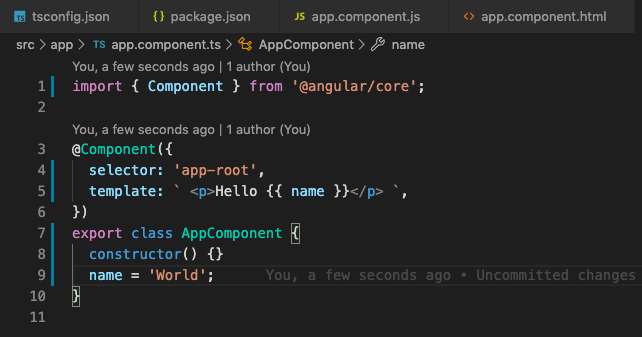
I am going to update the app.component.ts file as shown below.
app.component.ts
I have just added <p>Hello {{name}}<p> in the template and name variable in the component.
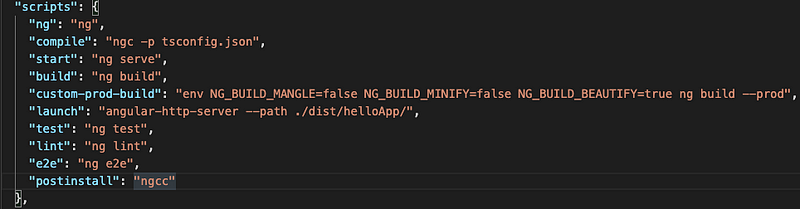
In my package.json , I have added a custom compile script that uses the Angular compiler (ngc) to compile and transform the Angular Component into JS files as shown below:
package.json scripts section
Let’s compile and examine the corresponding app.component.js file.
npm run compileAbove custom script, basically runs ngc -p tsconfig.json command and produces the output in dist/out-tsc directory based on tsconfig.json config.
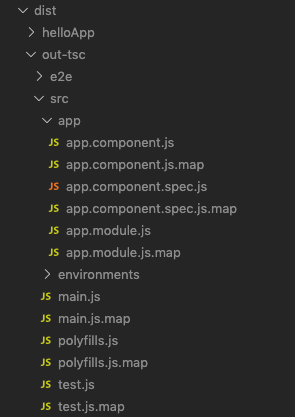
dist directory having the compiled files.
So, let’s see the compiled app.component.js file.
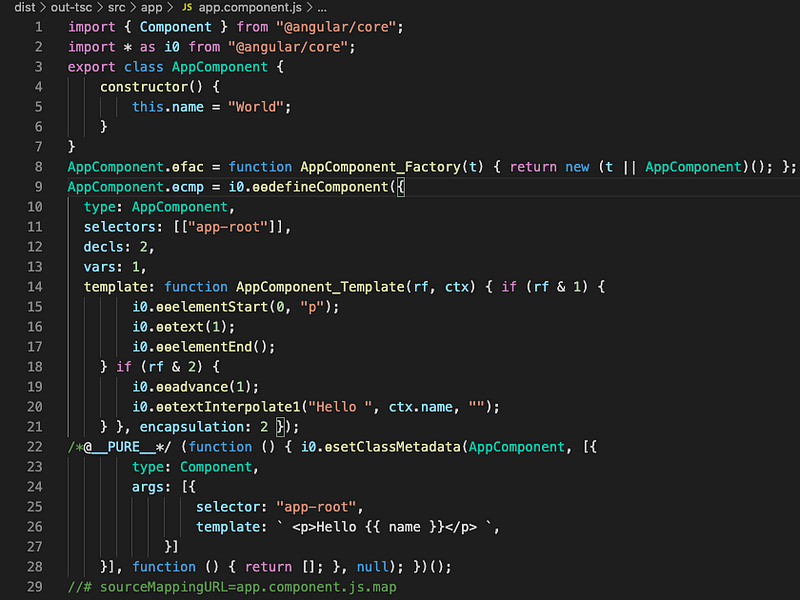
You will notice that this compiled version of our app.component.ts file is not that difficult to understand (I know this is just Hello World, but still ?). For this article, I am interested in the code between Line 15–20. The code and function between those lines are the Ivy Instruction or Template Instructions that create or update the DOM. There are several template instruction methods defined within the Angular Core package. For a better understanding of how the new Ivy compiler and these instructions set works, Please watch this.
For this example, where I want to display Hello World in a p tag and it is also using text binding/interpolation. Ivy generates the above instructions set and I am hoping that Ivy only includes those functions in the final prod bundle.
My plan is to do a prod build and then search for these instruction set function (ɵɵelementStart, ɵɵtextInterpolate1, etc.) in the main.bundle.js file. But wait a minute, prod build mangles the function name, minimizes the code and do all other things that make the code hard to read and search and the build won’t be of much use where I can search and show you that the Ivy instruction sets are included by the compiler or not.
While looking into solving this issue, where I want the prod optimization but without function name mangling, I discovered that Angular CLI accepts certain env variables and you can actually disable mangling, minify, etc during the prod build. This is cool and saved me a lot of hassle where I was thinking of overriding WebPack settings and disable mangling.
Environment variables for Angular CLI:
NG_BUILD_MANGLE,
NG_BUILD_MINIFY,
NG_BUILD_BEAUTIFY
I can just run following command and achieve my desired prod bundle.
env NG_BUILD_MANGLE=false NG_BUILD_MINIFY=false NG_BUILD_BEAUTIFY=true ng build --prodAlso, I am using angular-http-server to serve the prod build into the browser. You can find the custom script for custom-prod-build and launch in my package.json file.
After build and launch, just head to localhost:8080 and let’s search our main.bundle.js . I have a small video of the search that I did.
As you can see, I searched for elementStart and textInterpolate function and was able to find it. That’s expected, your app needs those methods to run. But this search only describes one side of the story, where Ivy includes the function that is needed by my application. What happens if I don’t do interpolation , does it get rid of this method from the prod bundle? Let’s find out.
I am going to update the app.component.ts file so that there is no interpolation. I am also going to get rid of <p> tag.
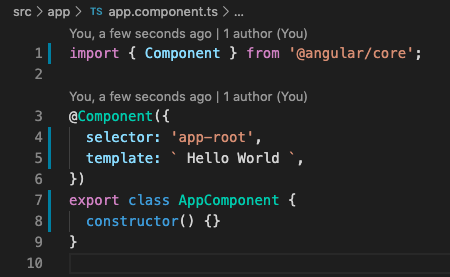
Let’s quickly see the compiled app.component.js file.
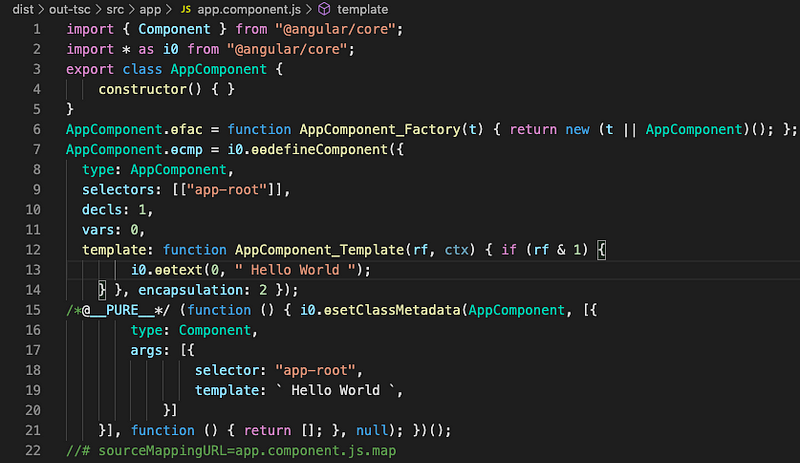
app.component.js
Now, we only have one template instruction (Line:13) to generate HelloWorld text (ɵɵtext() function). The application is not using any p tag or doing any interpolation, hence it does not need instruction methods such as ɵɵelementStart, ɵɵtextInterpolate1, etc. and therefore these methods should be removed from the final prod bundle.
Let’s do custom prod build and confirm our theory about tree-shaking unused methods from Angular core.
npm run custom-prod-build
npm run launch
Check out this video to show you the search.
In the above video, you will see that I am able to find the text method (expected). However, there is not a single occurrence of any function related to interpolation or elementStart instruction ?.
So, Angular compiler (prod mode) was successful in tree-shaking unused methods from Angular renderer. This is amazing and a big step towards making Angular builds smaller.
A Big Thank You to Angular Team and all the contributors for continuously working on improving the framework and the tools!! ?
Do let me know in the comments if you have any feedback/suggestions or you find any errors. You can also find me on Twitter (@esanjiv).
Keep Learning! Thanks!