
Why do we need Micro-Frontend?
During the past decade frontend applications, complexity has been increased. Much of the business logic is no longer preserved to the backend but also found on the client-side, this affects the application complexity and introduces a new monolith — The frontend application.
As the frontend become larger, while holding multiple domains of responsibilities (for example — navigation, user, authorization, e.g.), the frontend application is developed, deployed and hosted as a single application.
The separation is usually already found on the codebase while using a directory per module, library, and sometimes even application.
The micro-frontend allows us to use those different applications not just on the code base, but also in development, deployment and serve, in order to provide:
- Loosely coupled applications
- Faster development, debugging, and testing flows
- Performance — smaller chunks
- Full Isolation while testing, developing, and deploying
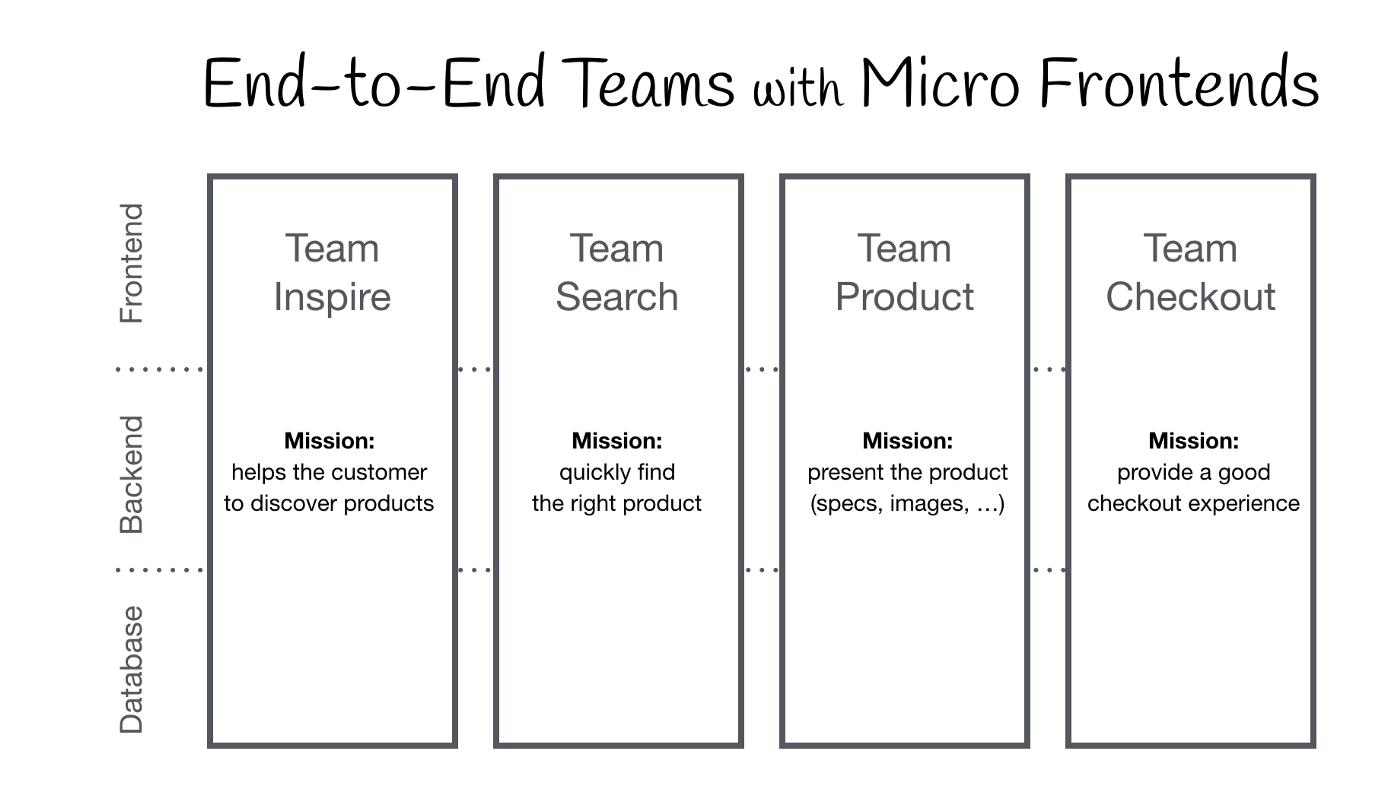
E2E Domains hold by different teams
Overview
During this article we will review the frontend application that is built out of the shell and 3 applications that represent a domain:
- Shell — Used as the entry point for loading each of our micro-applications based on the URL path. The shell application will also trigger authorization for route guards.
- Navigation — Responsible for navigation logic and state, including the nav-bar component, navigation service
- User — Responsible for user logic and state, including the user query and store logic, user info component, and user management page
- Feed — Responsible for fetching and presenting the feed items, each item contains the user logic and state, including the user query and store logic.
Each application built out the following layers
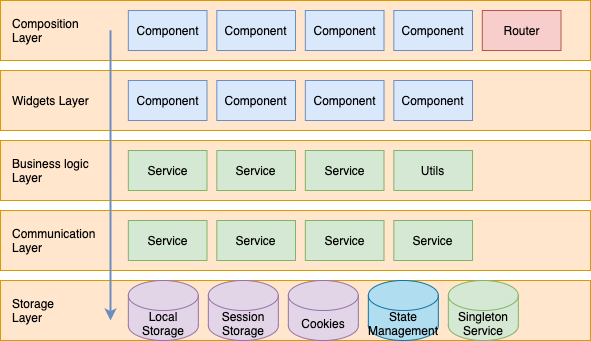
- Composition layer — This layer holds a set of application pages with their corresponding routes
- Widgets layer — This layer holds a set of domain-related components used to build the different pages found on the composition layer
- Business logic layer — This layer holds a set of services and utilities responsible for the domain business logic.
- Communication layer — This layer holds a set of services that are used to communicate with the different service providers (Backend services for example).
- Storage layer — This layer holds the logic to persist data into the storage objects
In memory — State, hooks e.g.
Disk — local-storage, indexedDB, cookies e.g.
The Chaos
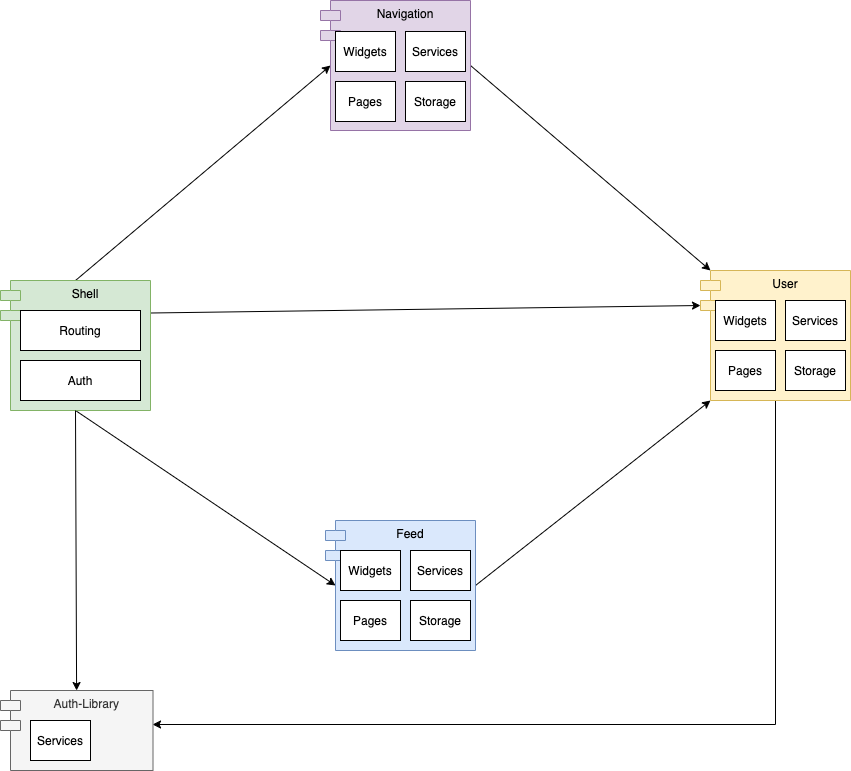
In this case, there is a clear relationship between the navigation application and feed application with the user application.
Thanks to module-federation, we can load Micro-frontends applications during run time without the need to build the entire dependency graph.
This provides us the ability to build and deploy each application independently. But, even though, we need to keep in mind all of those applications are going to be hosted side by side as a single monolith on the user browser.
This introduces a whole new aspect of stability issues of frontend applications:
- What happens when we are deploying a new version of our application (User in our scenario)?
- How can we identify affected areas?
- How can we guarantee there are no breaking changes hidden behind each deployment?
- How can we prevent tight coupling between multiple applications that are hosted together?
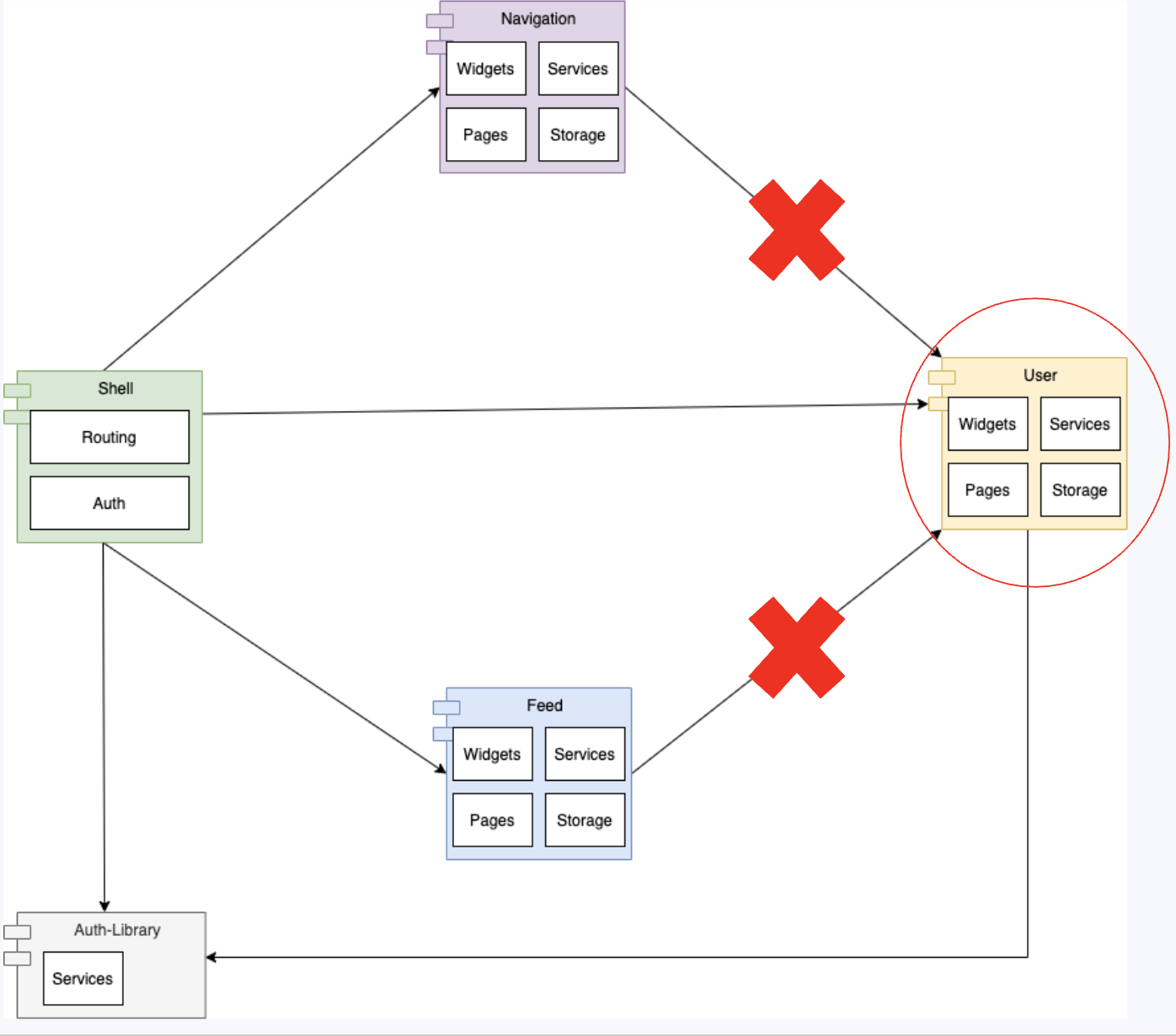
In our example, imagine a developer changed one of the widgets from the User application, this widget is consumed by both the Feed and the Navigation applications. Now, let's imagine the change the developer done is breaking the contract (component API — inputs/outputs, aka. props).
This will lead to a runtime error while loading the new version within the existing applications.
And the result? Cascading failure of our frontend application after deployment of the new User application.
Tackling the problem
First, let’s review the requirements we have from the micro-frontend applications:
-
Each application should be built, tested and served as a standalone unit.
-
A modification of a single application should be available to be used by any other application.
-
Application widgets and services should be reusable and interchangeable.
-
Encapsulation of application internal models and business logic — Modifications shouldn’t affect application consumers.
-
Identify dependency graph per modification — will help us to trigger only the relevant tests suites and builds.
Following those items, lets’ review the approach from the previous section:
The approach covers bullets 1 to 3 from the requirements list. But, it still fails for both bullets 4 and 5 which promise us the stability of our product.
Let’s review the different approaches to handle this chaos:
The libraries approach
In order to increase the stability of the application, we need to prevent hidden breaking changes.
With the libraries approach, this can achieve easily while using the npm package version. As each build of our applications is sealing the library version it’s using we can prevent consumption of library versions that might contain breaking changes.
Using module federation, we can set the shared libraries, as part of this configuration we can set the satisfied package version using the npm package versioning convention.
This approach helps us to break our monolith into 4 layers:
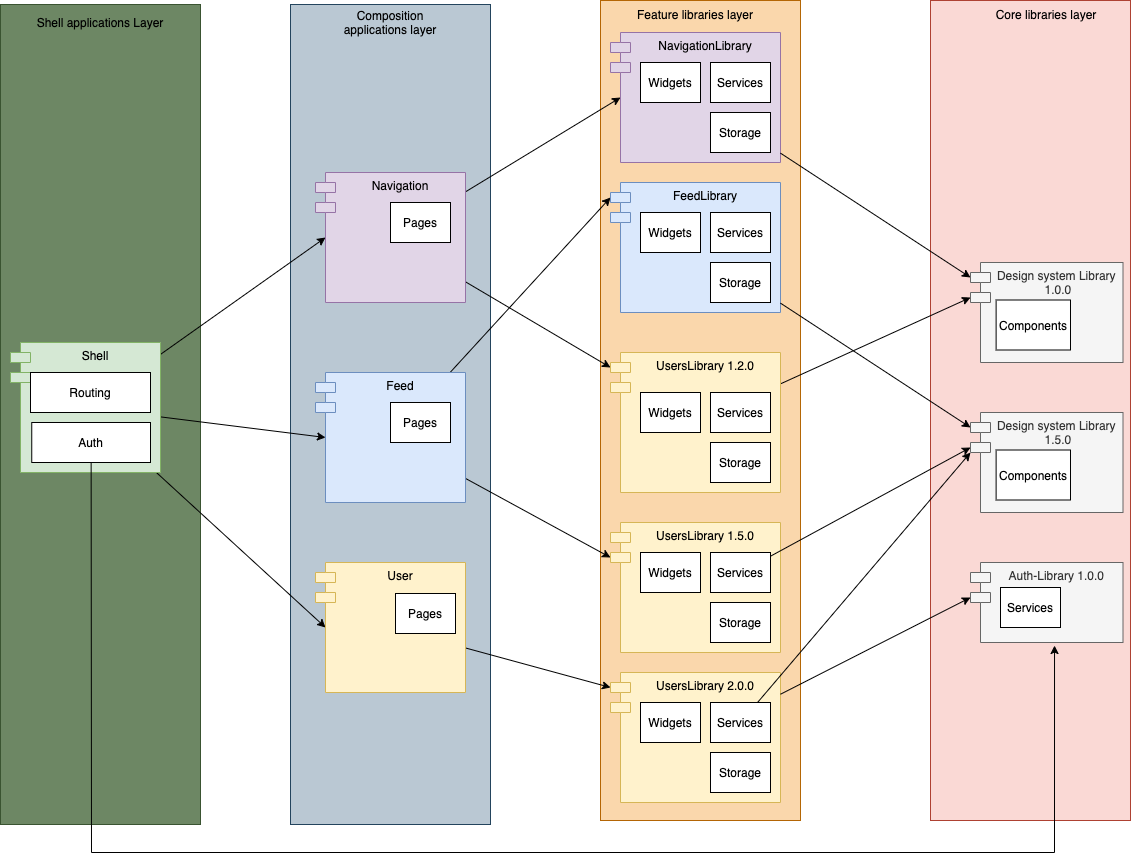
Libraries 4 layers approach
- Core Library — This layer contains domain agnostic libraries, those libraries provide us the building block for our feature libraries layer.
- Feature libraries layer — This layer contains domain-specific business logic, storage logic, and widgets. Those widgets are developed based on the core libraries component kit and additional components that are part of the specific domain of responsibility.
- Composition applications — This layer contains domain-specific routes and pages. Those pages are built based on widgets, services, and business logic developed as part of the “Feature libraries” layer.
- Shell — The entry point of the application, usually acts as a container and a router to load each of the micro-applications based on the path.
The shell application might also trigger authorization logic.
Although this approach covers bullets 1,3–5, Bullet 2 is the price needed to be paid. As a modification of a library is not reflected automatically to each consumer application but requires rebuilding and redeploying of these applications.
Setup
Structure:
- apps
  - user
  - feed
  - navigation
  - shell
- libs
  - users-lib
  - feed-lib
  - navigation-lib
  - auth
Webpack configuration:
plugins: [
  new ModuleFederationPlugin({
      name: "user",
      filename: "remoteEntry.js",
      exposes: {
          './bootstrap': './apps/user/bootstrap.module.ts',
      },
      shared: share({
        "@angular/core": { singleton: true, strictVersion: true, requiredVersion: '^12.0.0' },
        "@angular/common": { singleton: true, strictVersion: true, requiredVersion: '^12.0.0' },
        "@angular/common/http": { singleton: true, strictVersion: true, requiredVersion: '^12.0.0' },
        "@angular/router": { singleton: true, strictVersion: true, requiredVersion: '^12.0.0' },
        "@mfe/auth": { singleton: true, strictVersion: true, requiredVersion: '^1.0.0' },
        "@mfe/user": { singleton: true, strictVersion: true, requiredVersion: '^1.5.0' },        ...sharedMappings.getDescriptors()
      })
  }),
  sharedMappings.getPlugin()
],
Advantages
- Shareable widgets, services, and pages (compositions) across applications.
- Breaking changes prevention — Using a sealed version of the consumed library during the build.
Disadvantages
- Data corruption — Possible due to collision between multiple versions of the same library (override the state, local storage e.g.).
- Bundle size increase — Libraries might be loaded more than once due to different versions.
- Deployment graph complexity — critical modifications require rebuilding and redeploying the entire dependency graph.
The anti-corruption layer approach
What is the anti-corruption layer?
An anti-corruption layer is a set of Public-APIs exposed by an application for integration use, those Public-APIs are acting as contracts in order to isolate the application internal models and business logic complexity.
and are used as exported modules, components, façade*, and adapters* classes.
This layer can be uni-directional or bi-directional (fetch or ingest data).
Façade
A service that provides a simple interface to a complex application, encapsulates the complexity of initiating the application.
A façade might provide limited functionality, those are the required sub-set for integrating with the micro-frontend application
Adapter
A service that is responsible for covert the interface and the data model of an object to another structure/interface which is accepted by the consumers.
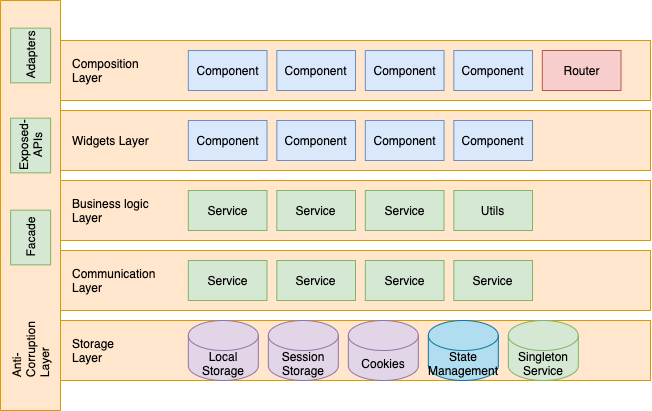
The updated 4-layers approach
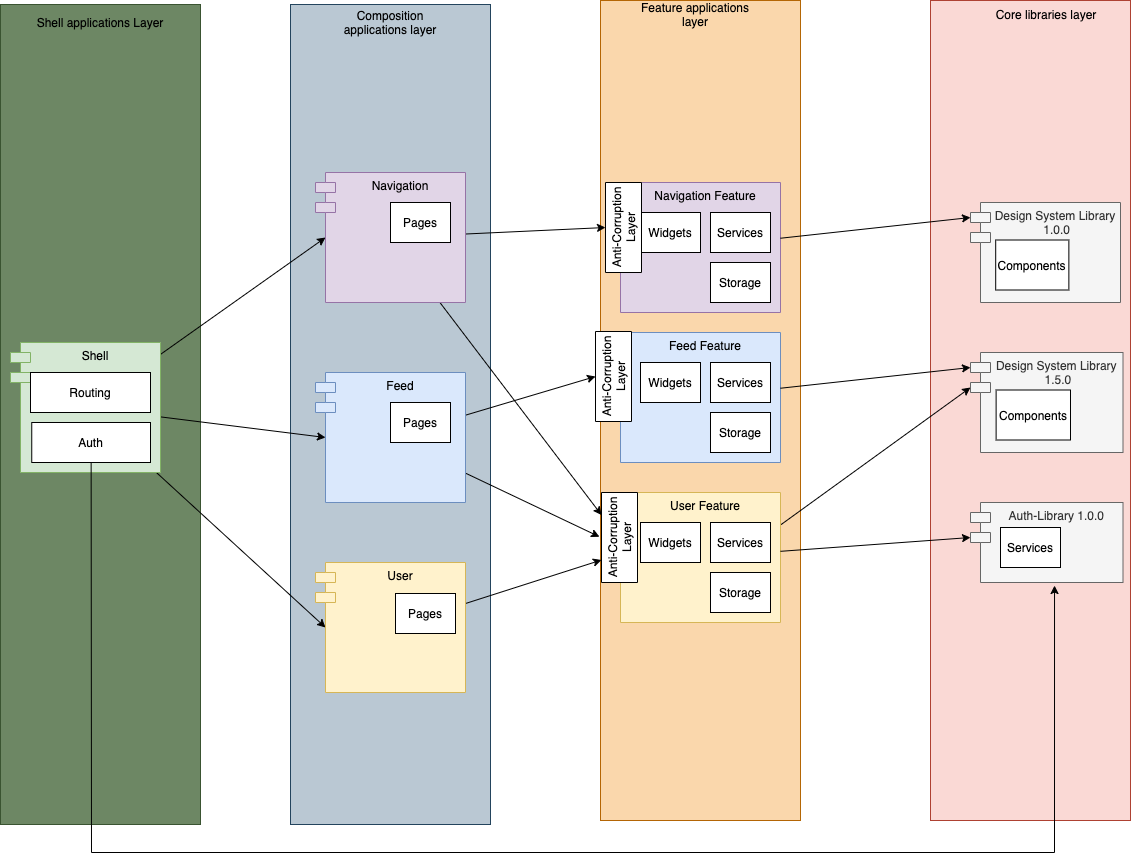
Anti-Corruption 4 layered approach
The only modification is casting the Feature layer from libraries to applications, this allows us to serve those widgets and services seamlessly to the consumers. Having said that we will still need to protect from breaking changes, here is where the anti-corruption layer is taking place
-
Core Library — This layer contains domain agnostic libraries, those libraries provide us the building block for our feature libraries layer.
-
Feature application layer — This layer contains domain-specific business logic, storage logic, and widgets.
Those widgets are developed based on the core libraries component kit and additional components that are part of the specific domain.
The exposed logic and components are protected with an anti-corruption layer to prevent breaking changes. -
Composition applications — This layer contains domain-specific routes and pages. Those pages are built based on widgets, services, and business logic developed as part of the “Feature application” layer.
-
Shell — The entry point of the application, usually acts as a container and a router to load each of the micro-applications based on the path.
The shell application might also trigger authorization logic.
Setup
Structure:
- apps
  - user
    - src
      - modules
        - bootstrap
          - bootstrap.module.ts
    - public-api.ts
    - public-api.d.ts
  - feed
     - src
      - modules
        - bootstrap
          - bootstrap.module.ts
    - public-api.ts
    - public-api.d.ts
  - navigation
    - src
      - modules
        - bootstrap
          - bootstrap.module.ts
    - public-api.ts
    - public-api.d.ts
  - shell
- libs
  - auth
Webpack configuration:
plugins: [
  new ModuleFederationPlugin({
      name: "user",
      filename: "remoteEntry.js",
      exposes: {
          './public-api': './apps/user/public-api.ts',
      },
      shared: share({
        "@angular/core": { singleton: true, strictVersion: true, requiredVersion: '^12.0.0' },
        "@angular/common": { singleton: true, strictVersion: true, requiredVersion: '^12.0.0' },
        "@angular/common/http": { singleton: true, strictVersion: true, requiredVersion: '^12.0.0' },
        "@angular/router": { singleton: true, strictVersion: true, requiredVersion: '^12.0.0' },
        "@mfe/auth": { singleton: true, strictVersion: true, requiredVersion: '^1.0.0' },
        ...sharedMappings.getDescriptors()
      })
}),
  sharedMappings.getPlugin()
],
tsconfig:
In order to help us identify the dependency graph between the different applications, we will expose the definition files, those will be used on the build step of our applications, and will apply static code analysis against the Facade and adapter interfaces
{
...
"paths": {
  "@mfe/feed": ["apps/feed/public-api.d.ts"],
  "@mfe/navigation-bar": ["apps/navigation-bar/public-api.d.ts"],
  "@mfe/user": ["apps/user/public-api.d.ts"]
}
...
}
Advantages
- Shareable widgets, services, and pages (compositions) across applications
- Seamless propagation of an upgrade
- Breaking changes prevention using Anti-Corruption layer.
- Refactor is becoming more simple thanks to encapsulation.
Disadvantages
- Another layer to be maintain
- Education and learning curve
- Integration testing is required to promise unbreaking changes

Bonus
React demo project using the anti-corruption layer (bit different than the picture and description below)
Angular demo project using the anti-corruption layer

Micro-Frontend Demo application
The frontend application is built out of:
- Shell Application
- Feed Application (Blue)
- Navigation Application (Purple)
- User Application (Yellow)
Both Feed and Navigation consume components and functionality from the User application.
The shell application consumes the composition applications of Feed, Navigation, and User to serve the different pages.