
Preventing autorun
There are certain scenarios where we may not want Angular to run change detection automatically.
This is often the case when the application code or a third party library
directly manipulates the DOM using the native API which bypasses Angular.
Another case when you might not want to have automatic change detection
is when a DOM event is triggered too often and triggers heavy computation.
A good example is scrolling event that is triggered tens of times per second.
In these situations, the ability to avoid redundant change detection can significantly improve the performance of your application.
A common way to prevent change detection is to define OnPush change detection strategy for a component:
@Component({
  selector: 'a-cmp',
  template: `{{ title }}`,
  changeDetection: ChangeDetectionStrategy.OnPush,
})
export class C {
  @Input()
  title = 'c-comp is here';
}
In this case, Angular will skip change detection for the subtree of child components unless input binding changes,
which is unlikely in scenarios mentioned above. Another common technique is to throttle
or debounce the event that occurs frequently which will result in lesser change detection cycles.
However, sometimes a much better option is to prevent automatic change detection altogether.
Run outside Angular zone
To avoid automatic change detection, we can use Angular’s API to run code outside of the Angular zone.
Since Angular doesn’t get notifications about async events happening in other zones,
there’s no automatic change detection. The method name to do this is called
runOutsideAngular
and it’s implemented by the NgZone service.
Let’s take a look at this code:
@Component({
  selector: 'app-root',
  template: `{{ time }}`,
})
export class AppComponent {
  time = Date.now();

  constructor() {
    setInterval(() => {
      this.time = Date.now();
    }, 500);
  }
}
We update the time property every 500ms and we see the screen updated with that interval:
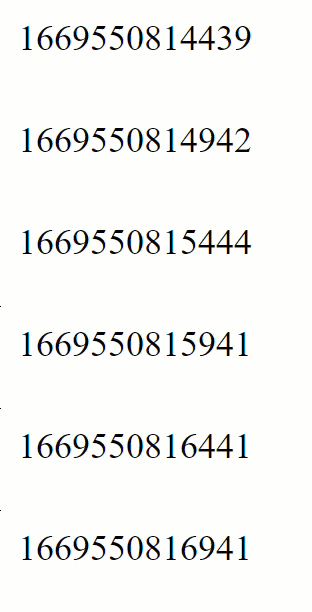
Now let’s modify the code to schedule the interval outside of Angular zone. To do that, we inject
NgZone and run setInterval outside of the Angular zone through runOutsideAngular method:
@Component({
  selector: 'app-root',
  template: `{{ time }}`,
})
export class AppComponent {
  time = Date.now();

  constructor(zone: NgZone) {
    zone.runOutsideAngular(() => {
      setInterval(() => {
        this.time = Date.now();
      }, 500);
    });
  }
}
Same code block is executed every 500ms, but the screen will not update this time
because there’s no more automatic change detection.
That happens because of how zones emit notifications.
All events that originate from the code in a particular zone will be handled in this zone.
In the case we just saw above, the setInterval macrotask is scheduled in the root zone,
and the notification about the event will be delivered to those listening to the events on the root zone.
But since Angular only subscribes to events in NgZone,
it doesn’t get notifications about setInterval executing and hence doesn’t run change detection.
We can still trigger change detection to update the screen through ApplicationRef.tick()
or other methods that we’ll take a close look in the section on
manual control of change detection:
@Component({
  selector: 'app-root',
  template: `{{ time }}`,
})
export class AppComponent {
  time = Date.now();

  constructor(zone: NgZone, app: ApplicationRef) {
    zone.runOutsideAngular(() => {
      setInterval(() => {
        this.time = Date.now();
        app.tick();
      }, 500);
    });
  }
}
Now it’s updating again:
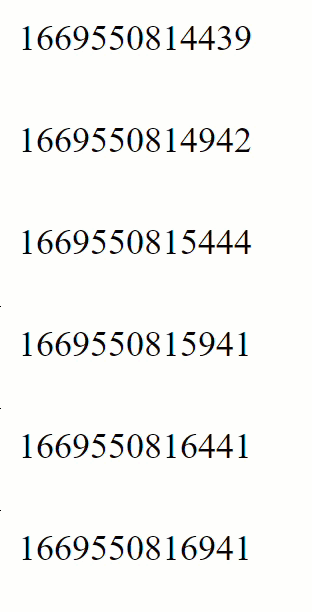
Nice.
Real world example
Let’s assume that you want to add tooltips to your application.
There’s no point in reinventing the wheel, therefore a reasonable approach is to make use of a third-party library, e.g.
tippy.js:
import { Component, ViewChild } from '@angular/core';
import tippy from 'tippy.js';

@Component({
  selector: 'f-cmp',
  template: ` <button #tippy class="btn btn-danger">Hover me!</button> `,
})
export class F {
  @ViewChild('tippy', { static: true }) tippy: any;

  ngOnInit() {
    tippy(this.tippy.nativeElement, {
      content: 'Hello world!',
    });
  }
}
It works great, however the change detection process is performed each time you hover over the button element.
We can see it by logging from inside ngDoCheck:
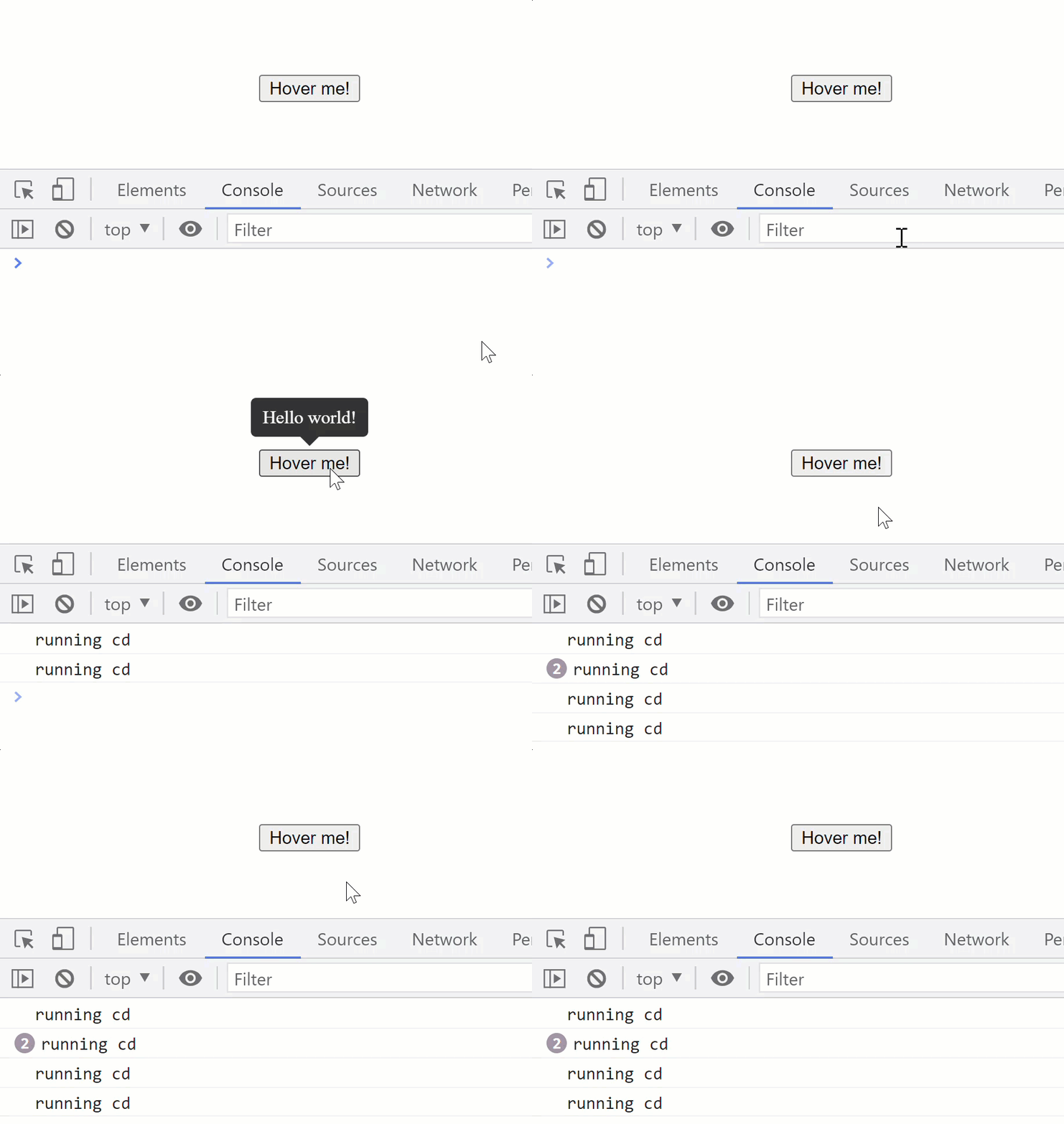
Undoubtedly, it’s redundant, since the tooltip element is added to the DOM in an imperative way using
the native API (no need to update bindings in template). Luckily, you can
opt-out of triggering the change detection process by invoking the initialization code outside of the NgZone:
@Component({
  selector: 'f-cmp',
  template: ` <button #tippy class="btn btn-danger">Hover me!</button> `,
})
export class F {
  @ViewChild('tippy', { static: true }) tippy: any;

  constructor(private zone: NgZone) {}

  ngOnInit() {
    this.zone.runOutsideAngular(() => {
      tippy(this.tippy.nativeElement, {
        content: 'Hello world!',
      });
    });
  }

  ngDoCheck() {
    console.log('running cd');
  }
}
This makes tippy to add all event listeners directly to the root zone:
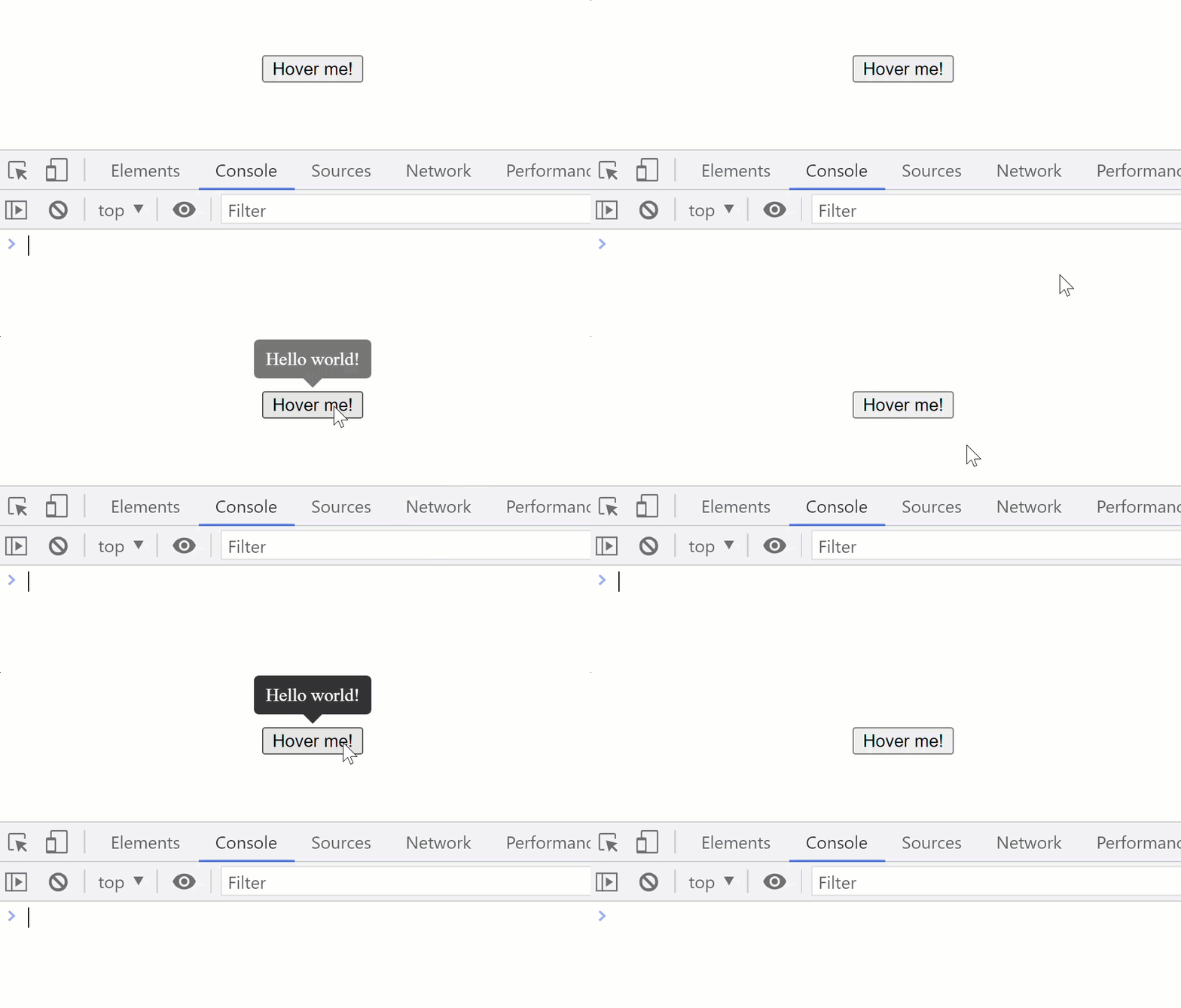
Easy to check if we put a debugger inside the source code of tippy and check the active zone:
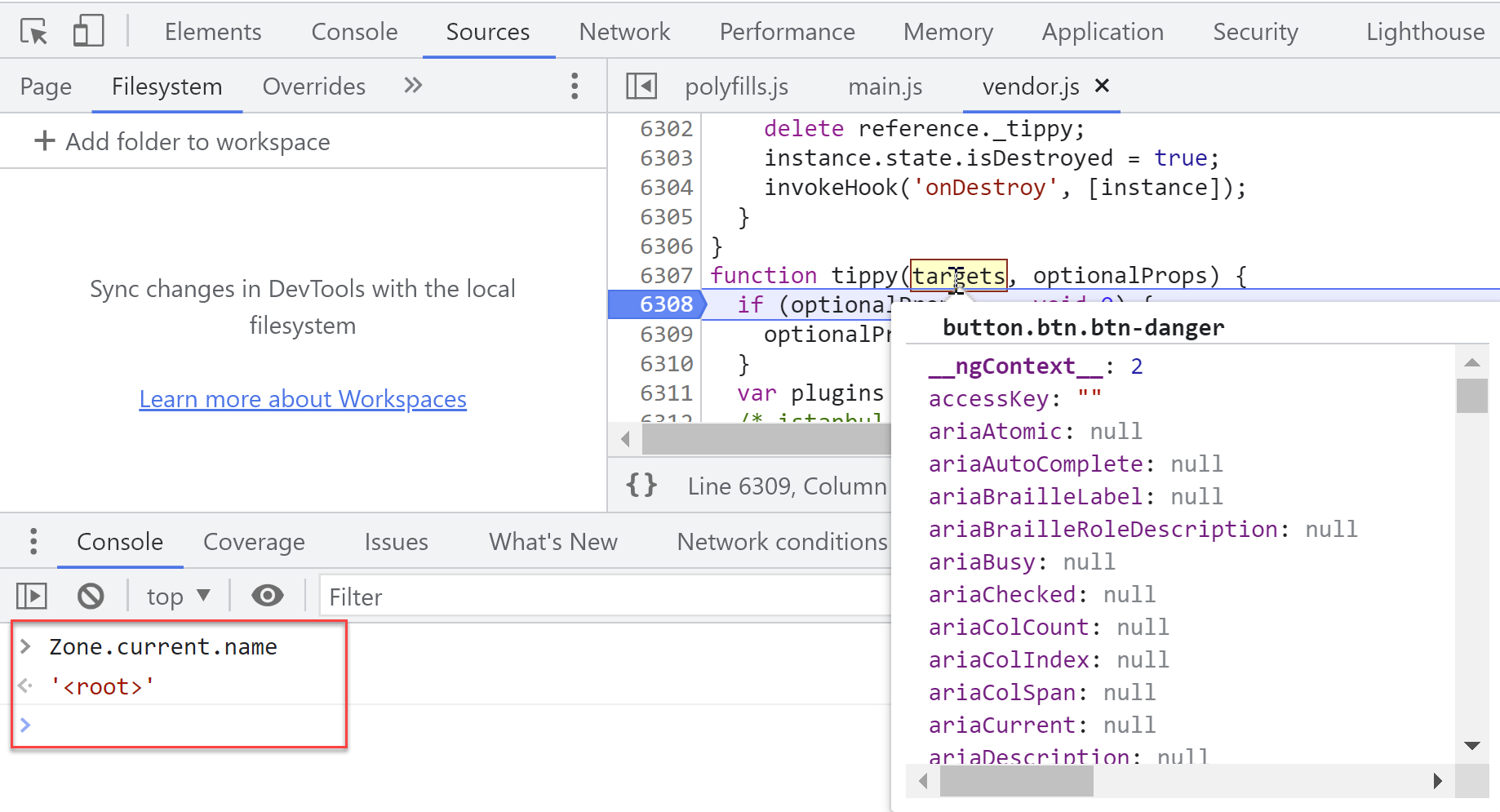
You can see here that the tippy library is inside the root zone when it runs initialization logic that adds event listeners.
Unexpected DOM updates
Sometimes developers wrap the property update with runOutsideAngular to avoid unnecessary change detection cycle,
but the change detection still happens and picks the new value for the property, so you will see the updates on the screen.
@Component({
  selector: 'app-root',
  template: `{{ time }}`,
})
export class AppComponent {
  time = Date.now();

  constructor(zone: NgZone) {
    setInterval(() => {
      zone.runOutsideAngular(() => {
        this.time = Date.now();
      });
    }, 500);
  }
}
That happens because runOutsideAngular
doesn’t mean Angular’s change detection won’t see the change, it only means that the code wrapped inside
runOutsideAngular doesn’t raise event notifications for NgZone.
In our case, since setInterval runs inside Angular zone, it’s meaningless to update the variable inside the runOutsideAngular,
since the event will be raised and change detection will run.
The same holds true for event listeners added inside Angular zone.
The following solution which simply runs the event callback outside of Angular will not prevent automatic change detection:
@Component({
  selector: 'g-cmp',
  template: `
    {{ time }}
    <button (click)="onClick()">Click me!</button>
  `,
})
export class G {
  time = Date.now();

  constructor(private zone: NgZone) {}

  onClick() {
    this.zone.runOutsideAngular(() => {
      this.time = Date.now();
    });
  }
}
If you click the button, change detection still runs and updates the screen.
There’s a way to register event handlers in Angular so that there’s no automatic change detection.
Let’s see how this can be done.
Registering event listeners outside of Angular zone
One way to work around this limitation is to grab a reference to the DOM node using
the ViewChild decorator
and manually register an event listener in one of the following way:
@Component({
  selector: "my-app",
  templateUrl: "<button #btn (click)="onClick()">Click me!</button>"
})
export class AppComponent implements AfterViewInit, AfterViewChecked {
  @ViewChild("btn") btnEl: ElementRef<HTMLButtonElement>;
  time = Date.now();

  constructor(private readonly zone: NgZone) {}

  ngAfterViewInit() {
    this.zone.runOutsideAngular(() => {
	    this.btnEl.nativeElement.addEventListener("click", () => {
        this.time = Date.now();
	    });
    });
  }
}
This time, clicking the button will not trigger the change detection process and you won’t see updated time value on the screen.
We could create a directive to reuse this approach when we need to add an event that doesn’t trigger change detection.
That’s how the directive will look like:
@Directive({
  selector: '[click.zoneless]',
})
export class ClickZonelessDirective implements OnInit, OnDestroy {
  @Output('click.zoneless') clickZoneless = new EventEmitter<MouseEvent>();
  private teardownLogicFn;

  constructor(private readonly zone: NgZone, private readonly el: ElementRef) {}

  ngOnInit() {
    this.zone.runOutsideAngular(() => {
      this.setupClickListener();
    });
  }

  ngOnDestroy() {
    this.teardownLogicFn();
  }

  private setupClickListener() {
    this.teardownLogicFn = this.el.nativeElement.addEventListener(
      'click',
      (event: MouseEvent) => this.clickZoneless.emit(event)
    );
  }
}
and that’s how you would use it:
<h2>Click handler outside NgZone</h2>
<button class="btn btn-primary" (click.zoneless)="onClick()">Click me!</button>
Although the solution that attaches the event listener to the native element outside of Angular zone works pretty well,
a more elegant and reusable solution would be based on custom Event Manager Plugin similar to
DomEventsPlugin.
I’ll show how to do that in the “Optimization techniques” section.