
“Hexagonal Architecture” emphasizes the idea of a core surrounded by multiple sides (like a hexagon, but the number of sides does not matter) representing different external systems (adapters), with ports as their interfaces.
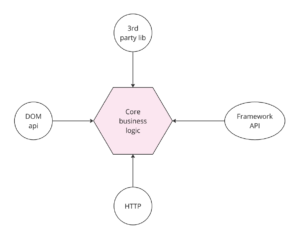
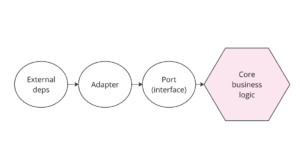
“Ports and Adapters” expresses the same simplified model in a more straightforward way and directly describes the components involved: Ports (interfaces) and Adapters (implementations). It is more commonly used when the visual metaphor of a hexagon is not needed.
Both Hexagonal Architecture and Ports and Adapters aim to decouple the business logic from external systems by using interfaces (ports) and implementations (adapters). They’re essentially the same thing, often used interchangeably to describe the same architectural pattern.
What is the Ports and Adapters pattern?
The Ports and Adapters architecture pattern was introduced by Alistair Cockburn (known mostly for cocreating and signing Manifesto for Agile Software Development in 2001). The central idea is to isolate the core business logic of an application (the application’s “heart”) from the external dependencies, such as databases, UI, and external services.
At the center of the architecture lies the core business logic. All the essential business rules, domain models, and application services are housed here. The core is independent of any external systems, ensuring the business logic can operate without directly relying on infrastructure details like browser API, HTTP layer, or framework-specific features. The core should be highly cohesive, encapsulating the logic that defines what the application does. Having no dependencies on infrastructure makes it easier to test and maintain.
Ports are abstract interfaces that define how the core interacts with the outside world. Examples might include services that define application use cases, like “createTodoItem” or “changeItemStatus”.
Adapters are concrete implementations of the ports. They act as the bridge between the core business logic and the external systems. Adapters translate the external data formats, protocols, or requests into a form that the core logic can understand and work with.
When and Why Should I Use Ports and Adapters?
This design pattern aims to make software applications more modular, maintainable, and adaptable to change.
- Separation of Concerns: By separating the core business logic from external systems, the Ports and Adapters architecture allows each part of the application to evolve independently. Changes in the infrastructure or external services do not affect the core logic, and vice versa.
- Modularity: The architecture encourages the development of modules that are easy to replace or upgrade. For instance, you can swap out a database adapter with another (e.g., moving from a relational database to a NoSQL database) without changing the core business logic.
- Testability: Since the core business logic is isolated from external dependencies, it can be tested independently using mock implementations of the ports. This leads to more reliable unit tests and easier identification of bugs.
- Flexibility: The architecture supports multiple interfaces for interacting with the application. For example, the same core logic can be accessed via a web UI, a command-line tool, or an external API by creating different inbound adapters.
if you feel like you’re having trouble with at least one of the things above, implementing Ports and Adapters might be a good idea.
Ports and Adapters (Hexagonal Architecture) in Angular
Fortunately, the implementation of Ports and adapters in Angular is very simple, thanks to Typescript itself and the Dependency Injection available in Angular.
Let’s start with the port implementation. As we explained above, it is nothing more than an abstract interface, so let’s adopt the Typescript interface for this purpose. The Port itself, just like the entire core business logic, should have no dependencies on any external infrastructure.
export interface FruitService {
  getAllFruits(): Observable<Fruit[]>;
  getFruitById(id: string): Observable<Fruit>;
}
On the other hand, the adapter is a concrete implementation of a port, so we can use a typescript class that actually implements the port:
@Injectable()
export class FruitServiceAdapter implements FruitService {
  private readonly httpClient = inject(HttpClient);

  getAllFruits(): Observable<Fruit[]> {
    return this.httpClient.get<Fruit[]>('/fruits/all');
  }
  getFruitById(id: string): Observable<Fruit> {
    return this.httpClient.get<Fruit>(`/fruits/${id}`);
  }
}
To create a link between the port and the adapter, we can create an injection token that represents the port but provides the adapter underneath.
export const FRUIT_SERVICE = new InjectionToken<FruitService>('fruit-service');


@Component({
  ...
  providers: [
    {
      provide: FRUIT_SERVICE,
      useClass: FruitServiceAdapter,
    },
  ],
})
export class App {
  fruitService = inject(FRUIT_SERVICE);
}
Thanks to the fact that we used port as a generic type in the injection token, the injected service is automatically typed as a port.
Ports and Adapters in Angular using abstract class
We can simplify the above implementation by taking advantage of the fact that in Typescript we can also use an abstract class as a type, and that, unlike an interface, it is not removed from the code during compilation.
Let’s modify our port into an abstract class with abstract properties:
export abstract class FruitService {
  abstract getAllFruits(): Observable<Fruit[]>;
  abstract getFruitById(id: string): Observable<Fruit>;
}
Adapter implementation needs no modification (in typescript class can implement other abstract class):
@Injectable()
export class FruitServiceAdapter implements FruitService { ... }
Finally, we can use abstract class also as injection token, without defining new token explicitly:
@Component({
  ...
  providers: [
    {
      provide: FruitService,
      useClass: FruitServiceAdapter,
    },
  ],
})
export class App {
  fruitService = inject(FruitService);
}
Stackblitz: https://stackblitz.com/edit/stackblitz-starters-xwxwca?file=src%2Ffruit-service%2Ffruit-service.port.ts
Final Thoughts:
Implementing the Ports and Adapters (Hexagonal) architecture in Angular helps organize your application and provides a robust framework for maintaining and scaling your projects over time. By separating your core business logic from the details of the external infrastructure, you achieve greater flexibility and testability. Angular’s strong TypeScript support and Dependency Injection mechanism make this architecture easy to implement, allowing you to define clear contracts (ports) and concrete implementations (adapters) seamlessly. As your application grows, the benefits of this pattern become even more apparent, making your codebase more modular, adaptable, and resilient to change. If you’re aiming for a well-structured, maintainable Angular application, adopting the Ports and Adapters architecture is a strategic choice that can set your project up for long-term success.