
Some new features have been added to the Angular Router with version 7.1.0:
- Router guards can now return a
UrlTree. This allows a guard to cancel the current navigation and redirect to the URL represented by theUrlTree. - There is now a notion of “guard priority”, which is used as a tie-breaker when multiple guards return a
UrlTreeduring a single navigation. - A new configuration option for
runGuardsAndResolverscalledpathParamsChangehas been added.
In this article, we’ll explore how to start using these new features. We’ll also understand the motivations behind them, and take a glance at how they are implemented in the Angular sources.
Jason Aden covered many of these topics in his excellent talk at AngularConnect 2018, so please be sure to check that out as well. The router portion of his talk starts here.
Perform Navigation/Redirects from Guards by returning a UrlTree
Motivation
Prior to this change, when multiple guards were executed during navigation, it was possible for each of them to start a navigation by calling navigateByUrl. In such scenarios, it was unclear as to which guard’s navigation should win.
With this change, the guard with the highest priority that returns a UrlTreewill cancel the current navigation, and a redirect will be made to the URL represented by the returned UrlTree.
We’ll see what “highest priority” means shortly.
Background
Before digging into this change, it’s worth understanding the differences between a URL and a UrlTree.
Inside the Angular Router, a URL string is represented using a structure called a UrlTree. It’s easy to convert a string URL into a UrlTree using the parseUrl method of the Router service:
const url = 'target';
const tree: UrlTree = this.router.parseUrl(url);
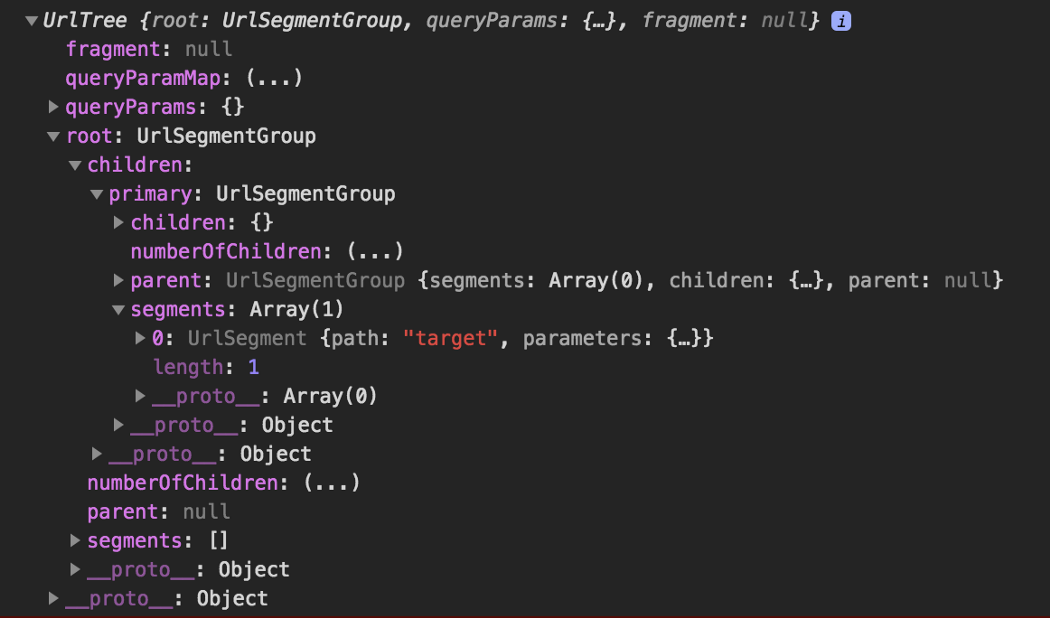
UrlTree generated from the URL ‘target’
If you’d like to know more about the relationship between URLs and UrlTrees in Angular, I’ve written about them in-depth in this article.
The Change
Prior to this change, Router guards could only return boolean values. A return value of true meant the navigation could proceed, and a return value of false would cancel the navigation.
Now, for CanActivate, CanActivateChild, and CanDeactivate, there is a third option; these guards can return a UrlTree directly. In these scenarios, the current navigation is cancelled, and a new navigation is created, which routes to the path specified by the returned UrlTree. For example, if a user fails an authentication guard, you may want to redirect that user directly to the login page.
Example
This example application has two routes:
const ROUTES: Route[] = [
  { path: 'target', component: TargetComponent },
  { path: 'redir', component: NeverGetHereComponent, canActivate: [CanActivateRouteGuard] }
];
We’ll make it so that /redir always redirects to /target instead of displaying NeverGetHereComponent. Rather than using redirectTo: 'target'inside of the Route definition for path: 'redir', we’ll let the CanActivateRouteGuard initiate the redirect instead.
We’ll start with an ordinary guard function, and modify its canActivatemethod to return a UrlTree instead of a Boolean value:
import { Injectable } from '@angular/core';
import { CanActivate,
         ActivatedRouteSnapshot,
         RouterStateSnapshot,
         Router,
         UrlTree } from '@angular/router';

@Injectable()
export class CanActivateRouteGuard implements CanActivate {

  constructor(private router: Router) {}

  canActivate(route: ActivatedRouteSnapshot, state: RouterStateSnapshot): boolean | UrlTree {
    const url = 'target';
    const tree: UrlTree = this.router.parseUrl(url);
    return tree;
  }
}
On line 15, we create a UrlTree from the URL string ‘target’.
As previously mentioned, [parseUrl](https://angular.io/api/router/Router#parseUrl) is a function from the Router service. It takes a URL encoded as a string and transforms it into a UrlTree.
Our guard is ready, so we’ll attach it to the { path: 'redir' ... } route.
{ path: 'redir',
  component: NeverGetHereComponent,
  canActivate:[CanActivateRouteGuard] }
Now, whenever we route to /redir, the navigation will proceed as normal until it checks the guards. When our guard function returns a UrlTree pointing to target, the navigation to redir will be cancelled, and a new navigation will begin, targeting target. We can confirm this by clicking the redirect link in Stackblitz:
and then checking the browser console:
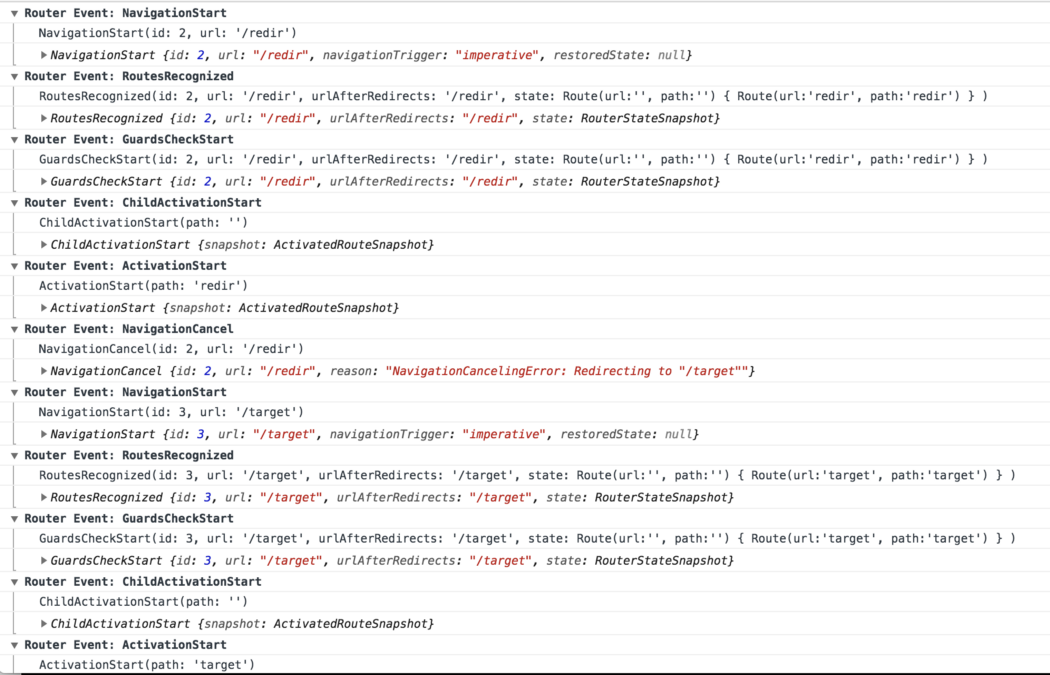
Bingo! NavigationCancel with “NavigationCancellingError: Redirecting to ‘/target’ ” message, followed by a NavigationStart to ‘/target’
That’s all it takes to set up redirects from route guards!
Guard Priority
We frequently have multiple guards protecting a route. You may be wondering what happens when multiple guards try to perform a redirect during a navigation. What if several of these guards return UrlTrees?
With Angular 7.1.0, there is a notion of guard priority. Guard priority is implemented internally via a custom RxJS operator called prioritizedGuardValue. We won’t get into the implementation details here, but this operator will make sure that the guard with the highest priority wins whenever multiple guards return UrlTrees.
Consider the following example:
{ path: 'redir',
  canActivate: [CanActivateRouteGuard, CanActivateRouteGuard2],
  children: [{
    path: 'dir',
    component: NeverGetHereComponent,
    canActivate: [ChildCanActivateRouteGuard]
    }]
}
parent and child canActivate guards
Here is how guard priority is calculated for multiple canActivate guards:
- The current route's
canActivateguards are processed before any of its children’scanActivateguards. - Within a
canActivatearray, the guard at index 0 has the highest priority, followed by the guard at index 1, and so on.
Another way of thinking about canActivate is that the guard closest to the root of the application has the highest priority. So in the above snippet, CanActivateRouteGuard has the highest priority, followed by CanActivateRouteGuard2, and then ChildCanActivateRouteGuard.
All guards in a given canActivate array are executed in parallel, but the router will wait until any guards with a higher priority to finish before moving on. So in the above example:
- Even if
CanActivateRouteGuard2returns aUrlTreeimmediately:
the router will still wait forCanActivateRouteGuardto resolve before initiating a new navigation. - If
CanActivateRouteGuardreturns aUrlTree:
that will win. - If it returns
false:
the entire navigation fails (and no redirects happen). - If it simply returns
true:
then the UrlTree returned byCanActivateRouteGuard2will be navigated to.
You can see how different scenarios play out by looking at the tests for the prioritizedGuardValue operator.
You can also experiment at this stackblitz. I recommend going into the three guards, and changing their delays and return values, as well as their order in the canActivate array in app.module.ts.
runGuardsAndResolvers has a new option: pathParamsChange
The official documentation describes the runGuardsAndResolvers option as:
defines when guards and resolvers will be run. By default they run only when the matrix parameters of the route change. When set to paramsOrQueryParamsChange they will also run when query params change. And when set to always, they will run every time.
With the new pathParamsChange option, guards and resolver functions will run only if the path or path parameters change. Changes to any other types of parameters, such as matrix parameters or query parameters, will not cause the guards and resolvers to run.
Motivation
As is described in the sources:
`pathParamsChange` Run guards and resolvers path or any path params change. This mode is * useful if you want to ignore changes to all optional parameters such as query *and* matrix * params.
Usage example
runGuardsAndResolvers is a property of Routes, so it is used in a route configuration:
{ path: '...', runGuardsAndResolvers: 'pathParamsChange'}
Summary
With the release of Angular 7.1.0, Route Guard functions now have the option of returning a UrlTree to cancel the current navigation and redirect to a route.
To initiate a redirect from a guard function, do the following:
- Create a guard function which uses
parseUrlto return a UrlTree - Register the guard with a route, as normal
There is also a new option for specifying when to run resolvers and guard functions, called pathParamsChange, which is useful when you only want to run guards and resolvers on essential navigations and ignore any optional parameters, like matrix or query params.