
Angular has supported lazy loading for a long time, but until recently it only worked well for whole routes and components. Services were the gap. A service registered in the root injector landed in the main bundle, and it stayed there even if almost nobody triggered the code path that used it.
Angular 22 closes that gap with injectAsync, a function that loads a service the first time you ask for the instance. This article walks through how it works, what it needs from you, and where it pays off. All the examples come from a real offer editor, so the numbers and file names are the ones I actually see in the browser.
The problem in short
The page in question is a form for creating a sales offer. People spend most of their time filling in contractors, products and conditions, then save a draft. At the bottom there is also a “Download PDF” button.
That button is expensive. Behind it sits a service that renders an offer component into a detached host, takes a snapshot of it, and slices the result into A4 pages. It needs a PDF writer and a DOM-to-image library to do that.
With a plain inject() call, the export service is part of what every user downloads, including everyone who only saves a draft and closes the tab.
Route-level lazy loading does not solve this. The page itself is already open, so the service simply travels inside the chunk the user has downloaded anyway.
The workaround before Angular 22 was to inject the Injector, write the dynamic import() by hand, and read the instance out of the injector once the import settled. It worked, and it was noisy enough that most people skipped it.
The new API: injectAsync
injectAsync comes from @angular/core and is stable as of version 22. You hand it a loader that returns a promise with the service class, and you get back a function that resolves to the instance.
import { Component, injectAsync } from '@angular/core';

@Component({
  selector: 'example-feature-new-offer-page',
  templateUrl: './feature-new-offer-page.html',
})
export class FeatureNewOfferPage {
  private readonly pdfExport = injectAsync(() =>
    import('@example/util-pdf-export').then((m) => m.PdfExportService),
  );

  protected async onDownloadPdf(): Promise<void> {
    const pdfExport = await this.pdfExport();
    await pdfExport.exportComponentToPdf({
      component: OfferDocument,
      inputs: { data: this.readonlyData() },
      fileName: `oferta-${this.offerId}.pdf`,
    });
  }
}
Two separate things are going on.
The dynamic import() is a signal to your bundler. It pulls @example/util-pdf-export out of the main bundle and emits it as its own JavaScript file, which nobody downloads at startup.
The call to this.pdfExport() is what sets everything in motion. It fetches that file, and once the code is there, Angular builds the instance through ordinary dependency injection. Nothing about the service changes: it keeps its own injected dependencies and there is still only one instance in the root injector. Angular holds on to the promise it created, so pressing the button a second time costs no network traffic at all.
One detail is easy to miss. injectAsync sits in a field initializer, not inside the click handler, because it needs an injection context just like inject() does. Only the await belongs in the method.
Requirement: the service must be auto-provided
This is the part that catches people out. When the chunk lands, Angular needs a provider it can use straight away. If the service does not register itself, there is nothing to build.
In practice that means one of two decorators. The familiar one:
@Injectable({ providedIn: 'root' })
export class PdfExportService { /* ... */ }
Or the shorter form that arrived in Angular 22:
import { Service } from '@angular/core';

@Service()
export class PdfExportService { /* ... */ }
@Service() puts the class in the root scope without any arguments. It covers the common case, while @Injectable() stays for everything with a different provider setup. You can also switch the automatic registration off and provide the class yourself, for example on a route or a component:
@Service({ autoProvided: false })
export class TabRegistry { /* ... */ }
A class declared that way is off limits for injectAsync, since there would be no provider waiting on the other side of the import.
Default exports
When the lazy class is the default export of its file, the .then() step is redundant. Pass the import as it is and Angular reads the default property itself:
@Service()
export default class PdfExportService { /* ... */ }
private readonly pdfExport = injectAsync(() => import('@example/util-pdf-export'));Prefetching so the user does not wait
Loading on demand moves the download to the worst possible moment, which is right after the click. The user waits for the network before anything visible happens.
You can start the download earlier by giving injectAsync a prefetch option. Whatever you pass has to return a promise, and Angular runs the loader once that promise settles.
One trigger comes with the framework. onIdle waits for a quiet moment in the browser:
import { Component, injectAsync, onIdle } from '@angular/core';

@Component({ /* ... */ })
export class FeatureNewOfferPage {
  private readonly pdfExport = injectAsync(
    () => import('@example/util-pdf-export').then((m) => m.PdfExportService),
    { prefetch: onIdle },
  );
}
Some pages never really go quiet, so you can put an upper bound on the waiting:
injectAsync(loader, { prefetch: () => onIdle({ timeout: 1_000 }) });Nothing depends on the prefetch actually finishing. A user who clicks before the background download has begun gets the normal on-demand path, and the await resolves as soon as the code is ready. The feature is a head start, not a precondition.
For project-wide control over idle behaviour, provideIdleServiceWith lets you replace the IdleService that sits underneath, usually in app.config.ts.
A trigger on your own terms
Here is where it gets interesting. A prefetch trigger is only a function returning a promise, and Angular never asks where that promise came from. Resolve it on a hover, on a scroll position, on a feature flag arriving from the server, on anything you can observe. Idle time is the default answer, not the only one.
For the PDF button, hovering is a much better hint than idleness. A pointer on its way to the button is close to a commitment.
The obstacle is timing. A viewChild signal holds undefined until the view has rendered, and the trigger is created before that. On top of that, the button lives inside an @if branch that switches between edit mode and preview mode, so the element can be destroyed and created again more than once.
So the trigger takes a function rather than an element, and watches it with an effect:
import {
  effect,
  ElementRef,
  inject,
  Injector,
  type EffectRef,
  type PrefetchTrigger,
} from '@angular/core';

type ElementSource = Element | ElementRef<Element> | undefined;

export interface ElementEventTriggerOptions {
  /** Events to listen for. The first one to fire starts the prefetch. */
  events?: readonly string[];
  /** Required when the trigger is created outside an injection context. */
  injector?: Injector;
}

export function onElementEvent(
  target: () => ElementSource,
  {
    events = ['pointerenter', 'focusin'],
    injector,
  }: ElementEventTriggerOptions = {},
): PrefetchTrigger {
  const ownInjector = injector ?? inject(Injector);
  let pending: Promise<void> | undefined;

  return () => (pending ??= waitForEvent(target, events, ownInjector));
}

function waitForEvent(
  target: () => ElementSource,
  events: readonly string[],
  injector: Injector,
): Promise<void> {
  let watcher: EffectRef | undefined;

  return new Promise<void>((resolve) => {
    watcher = effect(
      (onCleanup) => {
        const el = toElement(target());
        if (!el) return;

        const controller = new AbortController();
        onCleanup(() => controller.abort());

        const onEvent = () => {
          watcher?.destroy();
          resolve();
        };

        for (const name of events) {
          el.addEventListener(name, onEvent, {
            once: true,
            signal: controller.signal,
          });
        }
      },
      { injector },
    );
  });
}

function toElement(value: ElementSource): Element | undefined {
  return value instanceof ElementRef ? value.nativeElement : value;
}
What happens, step by step
The injector is grabbed first. onElementEvent runs in a field initializer, so inject(Injector) is legal there. It has to be saved, because the effect is created later inside a promise callback, where the injection context is gone. Passing it explicitly is what keeps Angular from throwing.
The returned function does nothing until Angular calls it. The resulting promise goes into pending, so a second call hands back the same promise instead of spinning up a second effect.
The effect waits for the element to appear. target() reads a signal. On the first pass it usually gives back undefined and the effect stops there, but Angular has already recorded the dependency. When the view renders and the signal receives a value, the effect runs again with a real element in hand.
Listeners share an abort signal. Every name in the list gets the same handler, and one controller.abort() detaches all of them. That matters because the list is configurable.
onCleanup covers both exits. It fires when the effect re-runs, which is exactly what happens when the preview toggle rebuilds the footer and produces a new button, and it fires again when the component is destroyed. Old listeners never outlive the element they belonged to.
The event ends the cycle. The effect destroys itself, since there is nothing left to observe, and resolve() hands control back to Angular, which starts the download. From that point the flow is identical to any other trigger.
focusin sits next to pointerenter deliberately. Someone navigating with the Tab key never produces a hover, and without that second event they would be the one group left waiting.
Using it
<button
  #pdfBtn
  mat-flat-button
  color="primary"
  [disabled]="isExportingPdf()"
  (click)="onDownloadPdf()"
>
  <mat-icon>picture_as_pdf</mat-icon>
  {{ isExportingPdf() ? 'Generating PDF…' : 'Download PDF' }}
</button>
// read: ElementRef is needed here. MatButton is a component, so a bare #pdfBtn
// would resolve to the MatButton instance instead of the DOM element.
private readonly pdfButton = viewChild('pdfBtn', {
read: ElementRef<HTMLElement>,
});
// The export is only needed after the click, so the chunk is fetched in the
// background as soon as the pointer or the keyboard focus reaches the button.
private readonly pdfExport = injectAsync(
() => import('@example/util-pdf-export').then((m) => m.PdfExportService),
{ prefetch: onElementEvent(() => this.pdfButton()) },
);read: ElementRef<HTMLElement> looks wrong at first glance, because a type argument shows up where a value belongs. It compiles. TypeScript permits type arguments on a generic constructor used as a value, and the signal ends up correctly typed as ElementRef<HTMLElement> | undefined.
Checking it in the browser
All of this is visible in the Network tab, which is the fastest way to confirm the split actually happened.
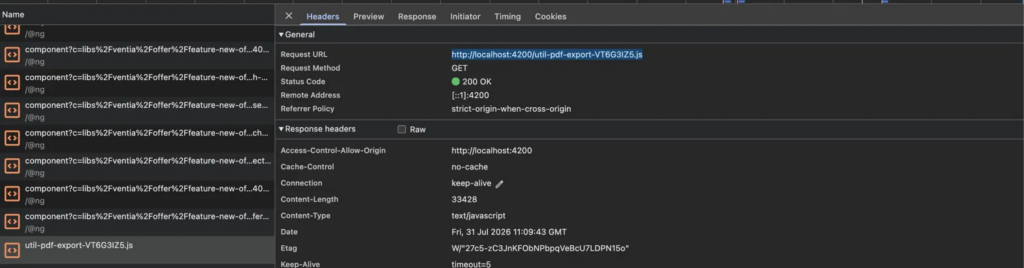
util-pdf-export-VT6G3IZ5.js arrives as its own file, roughly 33 kB in the development build. It is absent from the initial page load and appears the moment the pointer touches the button. For a user who never opens the export, it is never requested at all.
Name your chunks so you can find them
Look at that file name again: util-pdf-export-VT6G3IZ5.js. The readable half comes from the library that was imported, and the rest is a content hash for cache busting.
This is pure hygiene, and it pays for itself the first time you go looking. A real build produces dozens of chunks, and half the work of verifying a lazy load is picking the right row out of the list.
Giving the file or the library a name that says what it holds turns that into a one-second check. util-pdf-export tells you what you are looking at. So does feature-invoice-preview. Keeping one heavy dependency per chunk helps for the same reason, because a name only means something if the contents match it.
One mistake to avoid
Splitting only works if nothing drags the service back into the main bundle. A single ordinary import anywhere in the project is enough for the bundler to keep it where it was, and the dynamic import then buys you nothing.
Search the codebase for other imports of the same module. Where the class is only needed for a type annotation, switch to a type-only import, which disappears during compilation:
import type { PdfExportService } from '@example/util-pdf-export';Then rebuild and look at the Network tab again. A separate request and a smaller main bundle mean it worked.
When it is worth it
injectAsync earns its place when a service is both heavy and rarely used. PDF generation fits, and so do charting libraries, rich text editors, map SDKs, spreadsheet exports and analytics clients that only start after consent.
Small services are not worth splitting. A class with a handful of methods and no external dependencies weighs less than the round trip needed to fetch it, so you trade a smaller bundle for a slower first use and messier code.
The other cost is the async boundary. Every caller has to await the service, and that can spread if the service is used all over the component. The best candidates are the ones hidden behind a single user action, because then the boundary stays in one place.
Summary
Angular 22 turns lazy service loading from a manual trick into a supported part of the framework. Write injectAsync with a dynamic import, keep the service auto-provided through @Injectable({ providedIn: ‘root’ }) or @Service(), and add a prefetch trigger so the download happens before the user needs it.
onIdle covers most cases. When you want something sharper, a trigger is just a function returning a promise, and a hover on the button that needs the code is about as sharp as it gets.