
Since Signals landed in Angular, migrating away from complex RxJS streams felt like the obvious next step. And most of us did — at least partially. But there was always that one thing we didn’t want to lose: retaining the previous value when the reactive source changes — giving you more control over loading and skeleton views, and avoiding unnecessary UI flickering.
In this article we will explore how to take control of the loading and error states when working with the Angular Resource API — while retaining the previous data in both cases.
Loading Indicator – The Problem
When working with a grid of results, we typically have a search input that filters and refines what’s displayed.
While we wait for the HTTP response, we display a skeleton view to the user. Although this works, some UX guidelines suggest displaying a loading indicator instead, replacing the previous results only once the new ones arrive.
Let’s see how both approaches look.
Note: Let’s look at both — though to be clear, this article isn’t here to settle any UX debates, just to show you the tools.”
With skeleton loader
This is how the results look when we apply a new search. We display a skeleton loader.

With loading indicator
This is what we’ll try to achieve
This is how it looks when we apply a new search. We retain the results when the reactive source changes and we display a loading indicator. We then show the results once the API responds.

Let’s focus on the desired outcome which is the loading indicator. How can we achieve this using the `Resource` API when this API behaves like this:
While a new call is in progress
{
   "value": null,
   "status": "loading",
   "error": null,
   "isLoading": true
}
While a new call is done
{
  "value": T,
  "status": "resolved",
  "error": null,
  "isLoading": false
}
Looking at the response when the call is in progress, we can’t retain the previous results since the `value` is `null`. And yeah, luckily we have `resource` snapshots — and that’s exactly what we’ll use.

Resource Snapshot
A ResourceSnapshot is a representation of every resource state. A snapshot contains the properties `value`, `status`, and `error`.
When we make an HTTP call, we first get a snapshot with `{ status: ‘loading’ }`, then once it resolves, a snapshot with `{ value: T, status: ‘resolved’ }`. If there is any error, we get `{ error: error_object, status: ‘error’ }`.
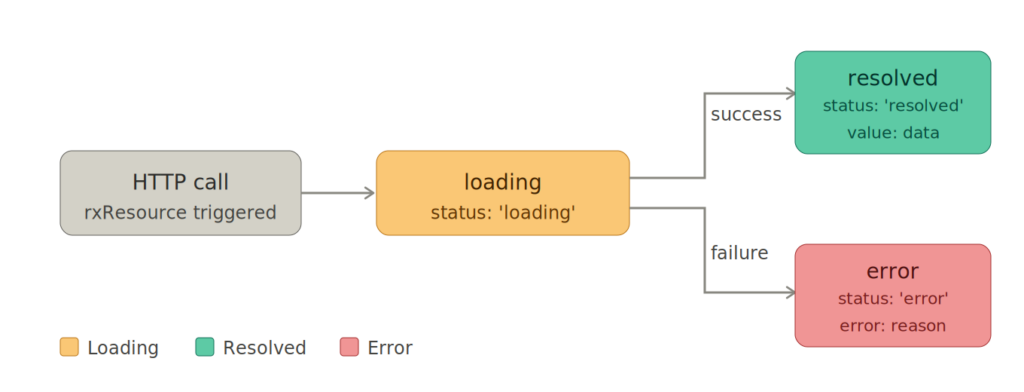
To understand how we can have access to the snapshot, let’s see an example:
 productsResource = rxResource({
   params: () => this.searchTerm(),
   stream: ({ params }) => this.productsService.getProducts(params),
 });
To access the snapshot we can do:
resourceSnapshot = productsResource.snapshot;
The snapshot is of type `ResourceSnapshot<T>` and has the following representation:
type ResourceSnapshot<T> = {
    readonly status: 'idle';
    readonly value: T;
} | {
    readonly status: 'loading' | 'reloading';
    readonly value: T;
} | {
    readonly status: 'resolved' | 'local';
    readonly value: T;
} | {
    readonly status: 'error';
    readonly error: Error;
};
But we cannot use the `snapshot` directly in the UI — it’s not a `Resource`. To use it, we have to convert it back to a `resource` using the `resourceFromSnapshots` function.
import {  resourceFromSnapshots } from '@angular/core';

productsResource = resourceFromSnapshots(resourceSnapshot);
Now that we have a good understanding of what the snapshot is, let’s put it to work.
Display loading indicator while retaining the values
Wait — when `isLoading` is `true`, the `value` is `undefined`. So how do we retain the previous data? That’s where `linkedSignal` comes in.
Let’s look at the example straight from the angular.dev documentation:
import {linkedSignal, resourceFromSnapshots, Resource, ResourceSnapshot} from '@angular/core';

function withPreviousValue<T>(input: Resource<T>): Resource<T> {
  const derived = linkedSignal<ResourceSnapshot<T>, ResourceSnapshot<T>>({
    source: input.snapshot,
    computation: (snap, previous) => {
      if (snap.status === 'loading' && previous && previous.value.status !== 'error') {
        return {status: 'loading' as const, value: previous.value.value};
      }
      return snap;
    },
  });
  return resourceFromSnapshots(derived);
}
@Component({
  /*... */
})
export class AwesomeProfile {
  userId = input.required<number>();
  user = withPreviousValue(httpResource(() => `/user/${this.userId()}`));
}
Let’s dive into the `withPreviousValue` and understand what it does.
function withPreviousValue<T>(input: Resource<T>): Resource<T> {
  const derived = linkedSignal<ResourceSnapshot<T>, ResourceSnapshot<T>>({
    // ...
  });
  return resourceFromSnapshots(derived);
}
This function accepts a `resource` as input, derives a new `snapshot` based on some logic, and converts it back to a `resource` using `resourceFromSnapshots`.
Let’s expand the logic to see what it does:
import {linkedSignal, resourceFromSnapshots, Resource, ResourceSnapshot} from '@angular/core';
function withPreviousValue<T>(input: Resource<T>): Resource<T> {
  const derived = linkedSignal<ResourceSnapshot<T>, ResourceSnapshot<T>>({
    source: input.snapshot,
    computation: (snap, previous) => {
      if (snap.status === 'loading' && previous && previous.value.status !== 'error') {
        return {status: 'loading' as const, value: previous.value.value};
      }
      return snap;
    },
  });
  return resourceFromSnapshots(derived);
}
The magic happens in the `computation` function of the linkedSignal where it handles the current active state of the `resource` and the `previous` state.
If the current status is `loading` and we have a `previous` value, it returns the loading status while keeping the previous value intact. And that’s it — exactly what we wanted to achieve, right?
All we have now to do is to use the function:
@Component({
  /*... */
})
export class ProductResultsComponent {
 private _productsResource = rxResource({
   params: () => this.searchTerm(),
   stream: ({ params }) => this.productsService.getProducts(params),
 });
 productsResource = withPreviousValue(this._productsResource);
}
We made it! Snapshots are powerful — and we’re just getting started. Let’s tackle the error case next.

Display error banner while retaining the values
Let’s assume we have some results already in our grid and we apply a new search that causes an error. How should we handle this case? Will we discard the page results or will we retain the data and display an error banner? Let’s do the latter.

Sounds simple enough — just add another condition. But there’s a catch. The problem is that we can’t combine `status: ‘error’` and `value` since the Resource API doesn’t support it.
type ResourceSnapshot<T> = {
    readonly status: 'idle';
    readonly value: T;
} | {
    readonly status: 'loading' | 'reloading';
    readonly value: T;
} | {
    readonly status: 'resolved' | 'local';
    readonly value: T;
} | {
    readonly status: 'error'; // <-- this is the type of our interest
    readonly error: Error;
};
But this is just a TypeScript type — we can extend it and define our own. Let’s try that approach:
export type CustomResourceSnapshot<T> =
  | ResourceSnapshot<T>
  | {
      readonly status: 'error';
      readonly value: T;
      readonly error: Error;
    };
If we try this approach it will fail — the Resource API throws when you try to access `value` in an error state, as you can see in this snippet from the Angular source code:
// snippet from angular source code
  readonly value = computed(() => {
    if (this.state.status === 'error') {
      throw new ResourceValueError(this.state.error);
    }
    return this.state.value;
  });
ref: https://github.com/angular/angular/blob/main/packages/core/src/resource/from_snapshots.ts#L32
The Resource API is responsible for mapping the HTTP response to a valid representation. To display an error banner while retaining the data, we need a custom function that initializes a Resource and manages its statuses — while introducing a custom error flag on the side.
export function resilientResource<T>(
  source: Resource<T>,
  options: {
    keepValueOnError?: boolean;
  } = {},
): ResilientResourceRef<T> {
  const hasError = signal(false); // <-- this is the flag of our interest

  const withValueOnError = (
    current: ResourceSnapshot<T>,
    previous: ResourceSnapshot<T> | undefined,
  ): ResourceSnapshot<T> => {
    if (current.status === 'error' && previous && previous.status !== 'error') {
      untracked(() => hasError.set(true)); // <-- set the error flag
      return { status: 'resolved', value: previous.value };
    }
    return current;
  };

  const handlers = [
    ...(options.keepValueOnError ? [withValueOnError] : []),
  ];

  const derivedSnapshot = linkedSignal<
    ResourceSnapshot<T>,
    ResourceSnapshot<T>
  >({
    source: source.snapshot,
    computation: (current, previous) =>
      handlers.reduce((acc, handler) => handler(acc, previous?.value), current),
  });

  const derived = resourceFromSnapshots(derivedSnapshot);

  return {
    value: computed(() => derived.value()),
    isLoading: computed(() => derived.isLoading()),
    error: computed(() => derived.error()),
    hasError: computed(() => hasError()), // <-- this is the custom error flag
  };
}
Here’s how we use it in our component:
 protected readonly productsResource = resilientResource(
    this._productsResource,
    {
      keepValueOnError: true,
    },
);
And since we are manually managing the error state, we can use the `hasError()` flag in the HTML:
@if (productsResource.hasError()) {
    <mat-toolbar color="warn" class="error-banner">
      <span
        >Something went wrong with your last search. Please refine and try
        again.</span
      >
    </mat-toolbar>
  }
Nice! Having this custom function, we can now display an error banner while retaining the data.
hmm, how about combining both handlers — the loading indicator and the error banner — into one?
Let’s put it all together:
export function resilientResource<T>(
  source: Resource<T>,
  options: {
    keepValueWhileLoading?: boolean;
    keepValueOnError?: boolean;
  } = {},
): ResilientResourceRef<T> {
  const hasError = signal(false); // <-- this is the flag of our interest

  const withValueWhileLoading = (
    current: ResourceSnapshot<T>,
    previous: ResourceSnapshot<T> | undefined,
  ): ResourceSnapshot<T> => {
    untracked(() => hasError.set(false)); // <-- reset the error flag
    if (
      current.status === 'loading' &&
      previous &&
      previous.status !== 'error'
    ) {
      return { status: 'loading', value: previous.value };
    }
    return current;
  };

  const withValueOnError = (
    current: ResourceSnapshot<T>,
    previous: ResourceSnapshot<T> | undefined,
  ): ResourceSnapshot<T> => {
    if (current.status === 'error' && previous && previous.status !== 'error') {
      untracked(() => hasError.set(true)); // <-- set the error flag
      return { status: 'resolved', value: previous.value };
    }
    return current;
  };

  const handlers = [
    ...(options.keepValueWhileLoading ? [withValueWhileLoading] : []),
    ...(options.keepValueOnError ? [withValueOnError] : []),
  ];

  const derivedSnapshot = linkedSignal<
    ResourceSnapshot<T>,
    ResourceSnapshot<T>
  >({
    source: source.snapshot,
    computation: (current, previous) =>
      handlers.reduce((acc, handler) => handler(acc, previous?.value), current),
  });

  const derived = resourceFromSnapshots(derivedSnapshot);

  return {
    value: computed(() => derived.value()),
    isLoading: computed(() => derived.isLoading()),
    error: computed(() => derived.error()),
    hasError: computed(() => hasError()),
  };
}
We can now keep the value while loading, keep it when an error occurs, or just use a simple resource with the default behavior.
With `resilientResource` in your toolkit, you now have fine-grained control over exactly how your UI behaves across every resource state — without sacrificing the simplicity Signals promised.

Code
If you want to see it in action, check out the repo branch here.
To run it locally, clone the branch first:
`git clone -b 84/resource-snapshot-loading-error https://github.com/profanis/codeShotsWithProfanis.git`
Then:
- start the web server: `npm start`
- start the Node.js server: `node server/index.js`
Thanks a lot for reading!