
With the advent of Redux, immutable update patterns have become widely popular. In a nutshell, the idea is to create a new object instead of altering the existing one when you need to perform an update action. When it comes to Angular applications, the immutability term is mostly mentioned when you deal with the OnPush change detection strategy in order to improve a runtime performance ?.
However, sticking to mutable update patterns may not only prevent you from taking advantage of narrowing a components tree subjected to the change detection process, but it also leads to some hard to spot bugs/gotchas.
In this blog post, I will cover consequences of not following the recommended approach of using immutable data structures.
Example
Let’s assume that you want to render a list of developers, where each one has the following properties:
export interface Dev {
  id: number;
  name: string;
  skill: number;
}
It’s required to render name, skill and seniority level, computed based on the skill value, for each entity:
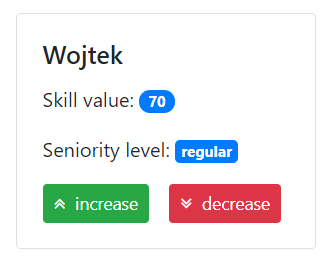
In addition, you can alter the skill property using the action buttons:
<div class="card-deck">
  <app-dev-card-v1 class="card" *ngFor="let dev of devs" [dev]="dev">
    <app-dev-actions (skillChange)="onSkillChange(dev.id, $event)">
    </app-dev-actions>
  </app-dev-card-v1>
</div>
By default, the change is performed in a mutable way:
import { Component } from "@angular/core";

import { Dev } from "../../dev.model";

@Component({
  selector: "app-devs-list",
  templateUrl: "./devs-list.component.html"
})
export class DevsListComponent {
  public immutableUpdatesActive = false;
  public devs: Dev[] = [
    { id: 1, name: "Wojtek", skill: 50 },
    { id: 2, name: "Tomek", skill: 80 }
  ];

  private skillDelta = 10;

  public onSkillChange(devId: number, increase: boolean): void {
    if (this.immutableUpdatesActive) {
      this.immutableChange(devId, increase);
    } else {
      this.mutableChange(devId, increase);
    }
  }

  private immutableChange(devId: number, increase: boolean): void {
    const multiplier = increase ? 1 : -1;

    this.devs = this.devs.map(dev =>
      dev.id === devId
        ? {
            ...dev,
            skill: dev.skill + multiplier * this.skillDelta
          }
        : dev
    );
  }

  private mutableChange(devId: number, increase: boolean): void {
    const dev = this.devs.find(({ id }) => id === devId);

    if (dev) {
      const multiplier = increase ? 1 : -1;

      dev.skill = dev.skill + multiplier * this.skillDelta;
    }
  }
}
Change detection strategy
For the sake of simplicity, let’s just render the skill value without the seniority level information:
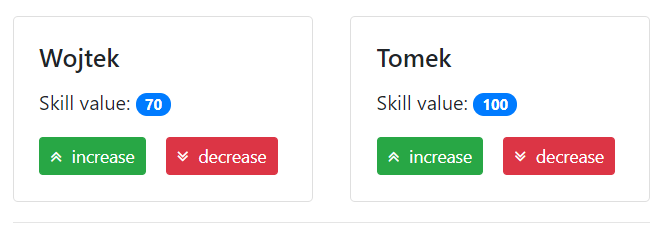
Using the Default change detection strategy (which is enabled, as the name suggests, by default), everything works as expected, namely the view gets updated once the model has changed by clicking action buttons ✔️.
import { Component, Input } from "@angular/core";

import { Dev } from "../../../dev.model";

@Component({
  selector: "app-dev-card-v2",
  templateUrl: "./dev-card-v2.component.html"
})
export class DevCardV2Component {
  @Input() public dev: Dev;
}
However, you cannot take advantage of the OnPush change detection strategy if you make use of mutable data structures:
import { Component, Input, ChangeDetectionStrategy } from "@angular/core";

import { Dev } from "../../../dev.model";

@Component({
  selector: "app-dev-card-v1",
  templateUrl: "./dev-card-v1.component.html",
  changeDetection: ChangeDetectionStrategy.OnPush
})
export class DevCardV1Component {
  @Input() public dev: Dev;
}
Now, the card’s template will not get updated once you alter a developer’s skill value, since it’s still the same JavaScript object referenced by the dev input property. Angular performs a referential check, hence from it’s point of view the data has not change and there is no need to take action.
ngOnChanges lifecycle hook
There are situation when you need to perform some calculations in order to compute a view model once the input data has changed. Angular provides the ngOnChanges lifecycle hook ⚓ ️for such scenarios:
import { Component, Input, OnChanges, SimpleChanges } from "@angular/core";

import { Dev, SeniorityLevel } from "../../../dev.model";

@Component({
  selector: "app-dev-card-v3",
  templateUrl: "./dev-card-v3.component.html"
})
export class DevCardV3Component implements OnChanges {
  @Input() public dev: Dev;

  public seniorityLevel: SeniorityLevel;

  private get skill(): number {
    return this.dev.skill;
  }

  ngOnChanges(simpleChanges: SimpleChanges) {
    if (!simpleChanges.dev) {
      return;
    }

    this.seniorityLevel = this.getSeniorityLevel();
  }

  private getSeniorityLevel(): SeniorityLevel {
    if (this.skill < 40) {
      return SeniorityLevel.Junior;
    }

    if (this.skill >= 40 && this.skill < 80) {
      return SeniorityLevel.Regular;
    }

    return SeniorityLevel.Senior;
  }
}
Even if you use the Default change detection strategy, the ngOnChanges lifecycle hook will not get invoked if you updated the dev input property in a mutable way. Once again, Angular performs a referential check for the sake of performance. It may lead to stale data being rendered in the view.
setter Input property
As an alternative to taking advantage of the ngOnChanges lifecycle hook, you can define an input property as a setter and perform calculations when a new value gets passed:
import { Component, Input, OnChanges, SimpleChanges } from "@angular/core";

import { Dev, SeniorityLevel } from "../../../dev.model";

@Component({
  selector: "app-dev-card-v4",
  templateUrl: "./dev-card-v4.component.html"
})
export class DevCardV4Component {
  @Input() public set dev(val: Dev) {
    this._dev = val;
    this.seniorityLevel = this.getSeniorityLevel();
  }

  public get dev(): Dev {
    return this._dev;
  }

  public seniorityLevel: SeniorityLevel;

  private _dev: Dev;

  private get skill(): number {
    return this.dev.skill;
  }

  private getSeniorityLevel(): SeniorityLevel {
    if (this.skill < 40) {
      return SeniorityLevel.Junior;
    }

    if (this.skill >= 40 && this.skill < 80) {
      return SeniorityLevel.Regular;
    }

    return SeniorityLevel.Senior;
  }
}
Unfortunately, the same problems arise as with the ngOnChanges lifecycle hook. The setter will not be called, since the referential check for a property updated in a mutable way indicates that it has not changed ?.
getter for view model data
If you cannot easily switch to immutable update patterns, one way to tackle the problem of rendering stale data is to compute view model data on the fly using getters:
import { Component, Input, OnChanges, SimpleChanges } from "@angular/core";

import { Dev, SeniorityLevel } from "../../../dev.model";
@Component({
  selector: "app-dev-card-v5",
  templateUrl: "./dev-card-v5.component.html"
})
export class DevCardV5Component {
  @Input() public dev: Dev;

  public get seniorityLevel(): SeniorityLevel {
    console.log("seniorityLevel getter called");

    return this.getSeniorityLevel();
  }

  private get skill(): number {
    return this.dev.skill;
  }

  private getSeniorityLevel(): SeniorityLevel {
    if (this.skill < 40) {
      return SeniorityLevel.Junior;
    }

    if (this.skill >= 40 && this.skill < 80) {
      return SeniorityLevel.Regular;
    }

    return SeniorityLevel.Senior;
  }
}
However, you still cannot make use of the OnPush change detection strategy for the component. Moreover, the getter gets called during each change detection cycle, therefore for heavy computations you should consider making use of the memoization technique ?.
ngDoCheck lifecycle hook
Another option is to perform calculations in the ngDoCheck lifecycle hook ⚓. It’s perceived as a last resort, since, similarly to getters, it gets invoked during each change detection cycle:
import { Component, DoCheck, Input } from "@angular/core";

import { Dev, SeniorityLevel } from "../../../dev.model";

@Component({
  selector: "app-dev-card-v6",
  templateUrl: "./dev-card-v6.component.html"
})
export class DevCardV6Component implements DoCheck {
  @Input() public dev: Dev;

  public seniorityLevel: SeniorityLevel;

  private get skill(): number {
    return this.dev.skill;
  }

  ngDoCheck() {
    console.log("ngDoCheck called");

    this.seniorityLevel = this.getSeniorityLevel();
  }

  private getSeniorityLevel(): SeniorityLevel {
    if (this.skill < 40) {
      return SeniorityLevel.Junior;
    }

    if (this.skill >= 40 && this.skill < 80) {
      return SeniorityLevel.Regular;
    }

    return SeniorityLevel.Senior;
  }
}
Note that, the ngDoCheck lifecycle hook gets called for a component with the OnPush change detection strategy as well. However, you still cannot apply it to the card component, since its template will not get updated — in order to update a component’s DOM bindings, it must be subjected to the change detection process.
pure Pipes
The best way to compute a view model value is to make use of a pure pipe (enabled by default). You get the memoization ? out of the box and you can easily share a common computation logic between different parts of your application:
import { Pipe, PipeTransform } from "@angular/core";

import { SeniorityLevel } from "../../dev.model";

@Pipe({
  name: "seniorityLevel"
})
export class SeniorityLevelPipe implements PipeTransform {
  transform(skill: number): SeniorityLevel {
    return this.getSeniorityLevel(skill);
  }

  private getSeniorityLevel(skill: number): SeniorityLevel {
    if (skill < 40) {
      return SeniorityLevel.Junior;
    }

    if (skill >= 40 && skill < 80) {
      return SeniorityLevel.Regular;
    }

    return SeniorityLevel.Senior;
  }
}
Now, the card component becomes quite tiny:
import { Component, Input } from "@angular/core";

import { Dev } from "../../../dev.model";

@Component({
  selector: "app-dev-card-v7",
  templateUrl: "./dev-card-v7.component.html"
})
export class DevCardV7Component {
  @Input() public dev: Dev;
}
<div class="card-body">
  <h5 class="card-title">{{dev.name}}</h5>
  <p class="card-text">
    Skill value: <span class="badge badge-pill badge-primary">{{dev.skill}}</span>
  </p>
  <p class="card-text">
    Seniority level:
    <span class="badge badge-primary">
      {{dev.skill | seniorityLevel}}
    </span>
  </p>
  <ng-content></ng-content>
</div>
The approach does not lead to unnecessary computations, since the transform method only gets called once the skill value has changed ?. However, you still cannot make use of the OnPush change detection strategy.
Conclusions
Undoubtedly, you should stick to immutable data structures in Angular applications. Not only does it allow you to improve a runtime performance by using the OnPush change detection strategy, but it also prevents you from getting into troubles of having stale data rendered in the view.
However, you may end up in a situation when you need to quickly fix a bug and you cannot afford a refactoring, namely switching to immutable update patterns. In such scenarios, it’s worth to keep in mind solutions based on getters, the ngDoCheck lifecycle hook and pure pipes. Alternatively, you may compute a view model in advance and pass tailored data directly to a component.
Feel free to play around with the examples:
I hope you liked the post and learned something new ?.