24 Jul 2024
5 min

How to exclude stylesheets from the bundle and lazy load them in Angular? – Angular Tutorials

How to exclude stylesheets from the bundle and lazy load them in Angular?

Let’s learn how we can load stylesheets only when needed without making them part of the application bundle.

We will try to understand this by taking example of multiple themes support.

Multiple theme files

Let’s assume that apart from main styles.css file, you have 2 theme files present:

  1. src/styles/themes/theme-light.css
  2. src/styles/themes/theme-dark.css

Next, you would have them in angular.json’s styles option:

"styles": [
    "src/styles.css",
    "src/styles/themes/theme-light.css",
    "src/styles/themes/theme-dark.css"
  ]

And lastly, you would handle loading of a particular theme based on the users’ choice or their preferences.

Everything works great, but both of your theme files are part of your application bundle all the time.

Exclude theme files

Let’s make a minor change in angular.json to exclude theme files from bundle:

"styles": [
    "src/styles.css",
    {
      "input": "src/styles/themes/theme-light.css",
      "inject": false,
      "bundleName": "theme-light"
    },
    {
      "input": "src/styles/themes/theme-dark.css",
      "inject": false,
      "bundleName": "theme-dark"
    }
  ]

Two new options to learn here:

  1. inject: Setting this false will not include the file from “input” path in bundle
  2. bundleName: A separate bundle will be created containing the stylesheet from “input” path

Now if you try to build the project, it will create separate files and the output will look something like below:
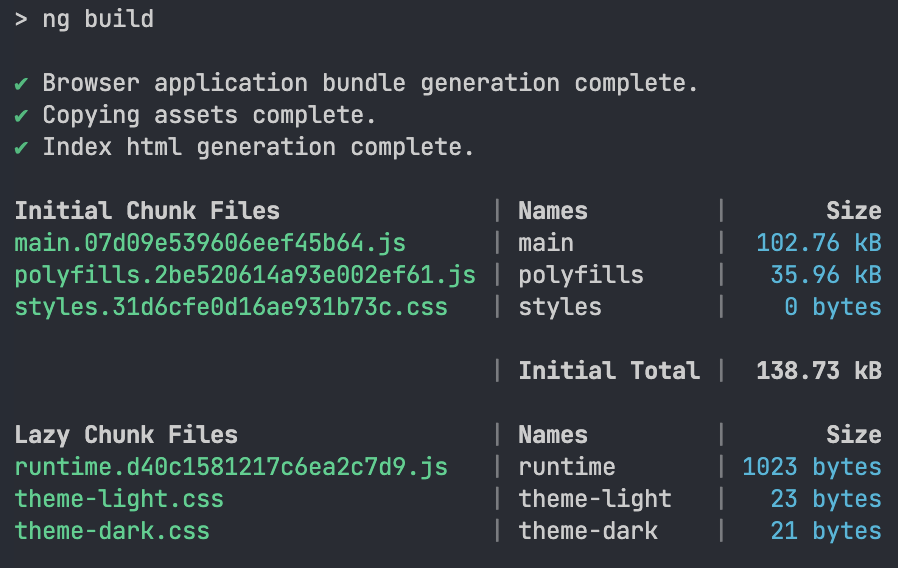
output of npm run build command

Notice that theme-light.css and theme-dark.css are part of Lazy Chunk Files. Lazy chunk files speed up the application load time, because they are loaded on demand.

Lazy load theme files

We managed to exclude them from the bundle and they are externally available. Now the question arises how to load these theme files?

One way to load them is to use their bundle directly with a link tag:

<link
  rel="stylesheet"
  href="theme-dark.css"
  media="(prefers-color-scheme: dark)" />
<link
  rel="stylesheet"
  href="them-light.css"
  media="(prefers-color-scheme: light)"
/>

You will maybe need to tweak the document base URL using base tag to successfully load them.

Conclusion

We learnt that we can exclude stylesheets by simply setting inject false in workspace configuration file, i.e. angular.json. And to load them on demand, we will use the bundleName option.

The advantage of excluding stylesheets from the bundle is reduced bundle size, which will in turn improve the initial load time of application and finally user experience will be better.

Frequently asked questions

How do I exclude a stylesheet from the bundle in Angular?

Set inject: false on that stylesheet's entry in the styles array of angular.json, instead of listing it as a plain string. Setting inject to false keeps the file out of the main bundle, so it no longer loads on startup. Add a bundleName so Angular emits it as a separate lazy chunk file that you can request later with a link tag.

How do I lazy load a theme CSS file in Angular?

Reference the emitted file in a <link rel="stylesheet"> tag, with href pointing to the bundle name such as theme-dark.css. Add a media attribute such as (prefers-color-scheme: dark) so the stylesheet applies only when that condition matches. Because excluded styles are no longer injected into index.html, this link tag is what makes the theme available to the page. Each theme needs its own link tag, and the browser picks the one whose media query matches.

How do I switch between light and dark CSS themes automatically based on user preference in Angular?

Use two <link rel="stylesheet"> tags, one with media="(prefers-color-scheme: dark)" and one with media="(prefers-color-scheme: light)", each pointing at its excluded theme bundle. The browser applies whichever matches the user's preference, so this basic case needs no TypeScript. Keep the file names aligned with your bundleName values, such as theme-light and theme-dark, so references stay consistent.

What does the bundleName option do in angular.json styles?

The bundleName option sets the name of the separate output file that Angular creates for an excluded stylesheet. The file is emitted as a lazy chunk, so it is not loaded with the initial application code. Setting bundleName: "theme-light" produces a theme-light.css file in the build output, which appears among the lazy chunk files and can be loaded on demand.

Why does my excluded theme CSS file fail to load in Angular?

A <link> to an excluded stylesheet can fail if its relative href does not resolve against the page's URL, which is when a <base> tag adjustment is needed. Set the href to the emitted bundle name, such as theme-dark.css, and confirm in the browser's Network tab that the request returns a 200 status. Without the base URL matching your deployment path, the theme file may not be found.

Share this post

Sign up for our newsletter

Stay up-to-date with the trends and be a part of a thriving community.