24 Jul 2024
2 min

concat – RxJS Reference

concat

concat combines a number of observables streams and sequentially emits all values from every given input stream. It only has one active subscription at a time from which the values are passed down to an observer. Once the current active stream completes it subscribes to next observable in a sequence. As values from any combined sequence are produced, those values are emitted as part of the resulting sequence. Such process is often referred to as flattening in documentation.

The operator works in the following way:

  1. Subscribe to the first source observable in a sequence
  2. When a new value arrives from a source observable, pass it down to an observer
  3. Once this source observable completes, subscribe to the next source observable in the sequence
  4. Only after all source observables complete, send the complete notification to the observer.
  5. If any of the source observables throws an error, send the error notification to the observer.

Please note that concat will never complete if some of the input streams don’t complete. This also means that some streams will never be subscribed to.

In the diagram below you can see the concat operator combining two streams A and B each producing 3 items and the values falling through to the resulting sequence first from the A and then from the B:
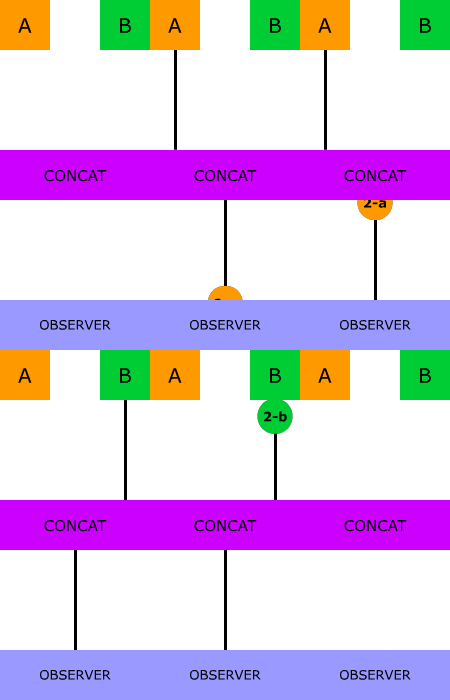
Concat operator diagram

Usage

Use this operator if the order of emissions is important and you want to first see values emitted by streams that you pass first to the operator. For example, you may have an observable sequences that delivers values from a cache and another sequence that delivers values from a remote server. Use concat if you want to combine them and ensure that the value from cache is delivered first.

Here’s an example of using concat on two streams:

const a = interval(500).pipe(map((v) => 'a' + v), take(3));
const b = interval(500).pipe(map((v) => 'b' + v), take(3));

concat(a, b).subscribe((value) => console.log(value));

Playground

Additional resources

See also

Frequently asked questions

What is the difference between concat and merge in RxJS?

concat() subscribes to each source observable one after another, so it only emits values from the next stream after the current one completes, preserving order. merge() subscribes to all sources at once and emits values as they arrive, so interleaving is possible. Use concat() when order matters, such as reading from a cache before a remote server, and merge() when you only care about values as soon as they are produced.

How do I combine two observables so the second starts only after the first completes in RxJS?

Pass both observables to concat(), for example concat(a, b).subscribe(...). The operator subscribes to the first source and forwards its values, then subscribes to the second source only once the first completes. Values from every source are emitted in the resulting sequence, and the complete notification is sent only after all sources complete.

Why does concat never emit values from the second observable in RxJS?

concat() never completes if an earlier input stream does not complete, and it does not subscribe to later streams until the current one completes. If the first observable is something like interval() without take() or a completion condition, the second observable is never subscribed to. Make sure each source completes, for example by adding take(3) as the article's example does.

What is the difference between concat and concatAll in RxJS?

concat() is a creation function that takes a fixed list of observables as arguments, while concatAll() is an operator that flattens a higher-order observable whose emitted values are themselves observables. Both process inner observables sequentially, one active subscription at a time. Use concat() when you already have the observables as separate arguments, and concatAll() when they arrive as a stream.

When should I use concat instead of concatMap in RxJS?

Use concat() when you have a fixed set of source observables that should run in a defined order, such as a cache followed by a remote server. Use concatMap() when each value from a source should trigger an inner observable that runs sequentially. concat() takes its inputs directly as arguments, whereas concatMap() maps each incoming value to a new observable.

Share this post

Sign up for our newsletter

Stay up-to-date with the trends and be a part of a thriving community.
