
Remember last time you paid on a website in one touch with Google Pay, Apple Pay or a card? For me, this is not a frequent case. On the contrary, each new internet store offers me a new payment form. I must search for my card and write down all the information from it. Next time when I want to pay in another store, I repeat the process.
This is not convenient. But there is an alternative. A browser standard Payment Request API solves this problem in modern browsers in the last two years with ease. Let’s see how we can implement it in Angular
What is it?
Almost all modern browsers implement the Payment Request API standard. It allows calling a modal in a browser where a user can pay in a few seconds. For example, it looks like this in Chrome:
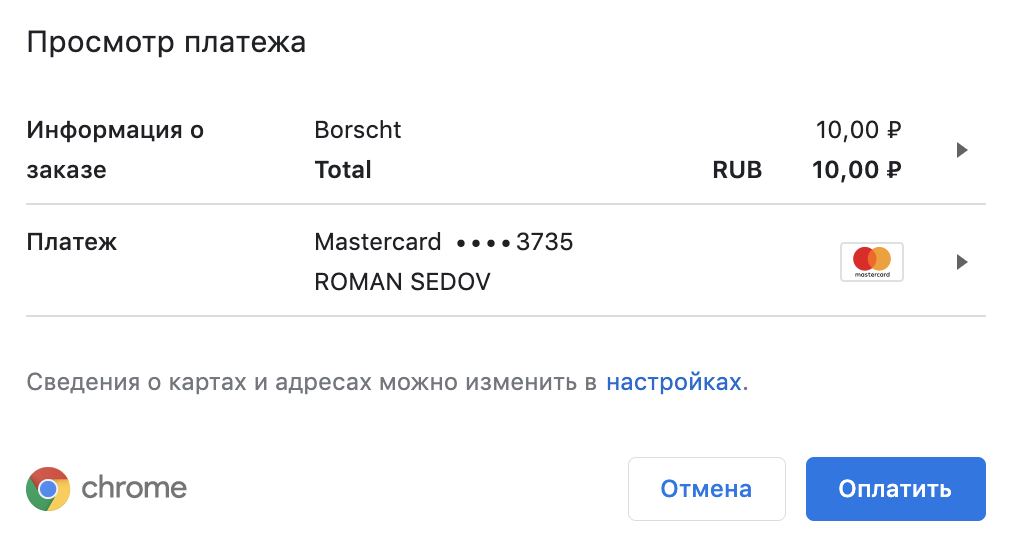
And the second screenshot is from Safari when paying with a fingerprint using Apple Pay:
It is both fast and featureful. A modal shows information about the whole order and about each item inside. It can ask a user for some details about him or her. For example, email, phone number or shipping address. It is very customizable, although the API's ease of use is questionable.
How can we implement it in Angular?
Angular does not have any abstractions over the Payment Request API. We can inject a Document token from the DI scope, get a Window object from Document and work with window.PaymentRequest. This is the safest way to use it.
import {DOCUMENT} from '@angular/common';
import {Inject, Injectable} from '@angular/core';

@Injectable()
export class PaymentService {
   constructor(
       @Inject(DOCUMENT)
       private readonly documentRef: Document,
   ) {}

   pay(
       methodData: PaymentMethodData[],
       details: PaymentDetailsInit,
       options: PaymentOptions = {},
   ): Promise<PaymentResponse> {
       if (
           this.documentRef.defaultView === null ||
           !('PaymentRequest' in this.documentRef.defaultView)
       ) {
           return Promise.reject(new Error('PaymentRequest is not supported'));
       }

       const gateway = new PaymentRequest(methodData, details, options);

       return gateway
           .canMakePayment()
           .then(canPay =>
               canPay
                   ? gateway.show()
                   : Promise.reject(
                         new Error('Payment Request cannot make the payment'),
                     ),
           );
   }
}
If you use Payment Request without abstractions, you can get into trouble. Testing the code is harder, it does not work in SSR, because there is no Payment Request and it depends on a global object.
We can use the WINDOW injection token from @ng-web-apis/common to get a global object from DI safely. Now we can make a new token PAYMENT_REQUEST_SUPPORT. It will check for Payment Request API support in the browser before using it. Then the situation when you try to call an unsupported API will never happen.
export const PAYMENT_REQUEST_SUPPORT = new InjectionToken<boolean>(
   'Is Payment Request Api supported?',
   {
       factory: () => !!inject(WINDOW).PaymentRequest,
   },
);
export class PaymentRequestService {
constructor(
@Inject(PAYMENT_REQUEST_SUPPORT) private readonly supported: boolean,
...
) {}
request(...): Promise<PaymentResponse> {
if (!this.supported) {
return Promise.reject(
new Error('Payment Request is not supported in your browser'),
);
}
...
}Usage in a service
Let’s do it the Angular way
Using the token that I described above, we can work with Payment Request safely enough. But it is still the “pure” browser API — we have to call a method with three parameters collecting a lot of data together and mapping it to the right format.
But in the Angular world, we use many conveniences. Dependency Injection, services, directives, and streams allow us to do our work better. Let’s look at a declarative solution that makes using the Payment Request API fast and easy.
The shopping cart in the example above is implemented with the following code:
<div waPayment [paymentTotal]="total">
   <div
       *ngFor="let cartItem of shippingCart"
       waPaymentItem
       [paymentLabel]="cartItem.label"
       [paymentAmount]="cartItem.amount"
   >
       {{ cartItem.label }} ({{ cartItem.amount.value }} {{ cartItem.amount.currency }})
   </div>

   <b>Total:</b>  {{ totalSum }} ₽

   <button
       [disabled]="shippingCart.length === 0"
       (waPaymentSubmit)="onPayment($event)"
       (waPaymentError)="onPaymentError($event)"
   >
       Buy
   </button>
</div>
It works due to the three Angular directives:
- waPayment directive defines a scope for a new payment. It needs PaymentItem object with information about a label and a total sum of the payment
- Each item of the shopping cart is a waPaymentItem directive. It is a declarative PaymentItem for your Payment
- Clicking on the button starts a PaymentRequest modal in your browser that returns a PaymentResponse or an error. The waPaymentSubmit directive emits both these events.
This way we have a simple and convenient interface for making a payment and handling its final result. And it works in true Angular fashion!
The directives are connected together:
- The payment directive collects all payment items inside itself using ContentChildren. It also implements PaymentDetailsInit — one of the required arguments to call a Payment Request.
@Directive({
   selector: '[waPayment][paymentTotal]',
})
export class PaymentDirective implements PaymentDetailsInit {
   ...
   @ContentChildren(PaymentItemDirective)
   set paymentItems(items: QueryList<PaymentItem>) {
       this.displayItems = items.toArray();
   }

   displayItems?: PaymentItem[];
}- The output-directive is listening to clicks on the button and emits the final payment result. It gets a payment directive from DI and also payment methods and additional payment options that we provide in DI.
@Directive({
   selector: '[waPaymentSubmit]',
})
export class PaymentSubmitDirective {
   @Output()
   waPaymentSubmit: Observable<PaymentResponse>;

   @Output()
   waPaymentError: Observable<Error | DOMException>;

   constructor(
       @Inject(PaymentDirective) paymentHost: PaymentDetailsInit,
       @Inject(PaymentRequestService) paymentRequest: PaymentRequestService,
       @Inject(ElementRef) {nativeElement}: ElementRef,
       @Inject(PAYMENT_METHODS) methods: PaymentMethodData[],
       @Inject(PAYMENT_OPTIONS) options: PaymentOptions,
   ) {
       const requests$ = fromEvent(nativeElement, 'click').pipe(
           switchMap(() =>
               from(paymentRequest.request({...paymentHost}, methods, options)).pipe(
                   catchError(error => of(error)),
               ),
           ),
           share(),
       );

       this.waPaymentSubmit = requests$.pipe(filter(response => !isError(response)));
       this.waPaymentError = requests$.pipe(filter(isError));
   }
}
The whole solution
We collected all these ideas and implemented it in a library @ng-web-apis/payment-request.
- Here you can find a Github repository with all the code.
- And here is the demo sample that I used to make screenshots and GIF’s for this article.
It is a ready to use solution that allows you to work with the Payment Request API safely and quickly using a service or directives.
The library is published and supported by @ng-web-apis. They are an opensource group that specializes in idiomatic lightweight implementations of native Web API’s in Angular. On our website you can find other APIs that Angular does not support out-of-the-box such as Web Audio, Web MIDI and Geolocation.