
Introduction
SOLID is a set of principles thanks to which we can create a code that is scalable, can be extended easily, and change implementations of existing mechanisms. Although most of the principles have existed since the last century, they are still valid and are one of the most important elements of object-oriented programming. It’s worth acknowledging them in your everyday work as an Angular developer.
The acronym SOLID consists of:
- Single Responsibility Principle,
- Open/Closed Principle,
- Liskov Substitution Principle,
- Interface Segregation Principle,
- Dependency Inversion Principle.
Single Responsibility Principle
First comes the letter S. It stands for the Single Responsibility Principle.

Credit: Derick Bailey, CC-SA 3.0
As illustrated above, we can have a code (a class/a method) which is like a pocket knife – it’s able to do everything. But that doesn’t mean we should proceed that way.
“A class should have one, and only one, reason to change”.
Repeating after Robert Martin – when creating our code, we should write it in such a way that if the requirements change, the class only has one reason to change.
What are its benefits?
- the code is easier to write (because we cover less functionality within one file than one file with many),
- prevents unexpected “side-effects”
- reduces the number of changed classes (the more responsibility a class has, the more often it will be changed). We aim to make as few changes as possible (because every change involves changing classes/components depending on the changed object).
Classes/Objects with one responsibility are:
- easier to understand
- lead to fewer bugs
- speed up the development process
What’s the best way to stick to this principle? Before each code change (or when we sit down to write a new one), just ask yourself: what responsibility does this code have? If there is more than one “and”, then it is most likely suitable for refactoring.
Let’s look at the example below:
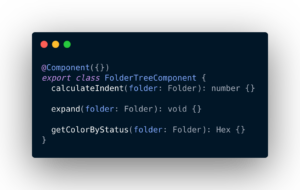
The snippet above is a fragment of the code component that makes up the folder tree. We can see the following methods:
- calculateIndent → which is used to calculate the indent that a component must have in the tree depending on its nesting,
- expand → which is used to open a folder and show a list of subfolders
- getColorByStatus → which is used to calculate the color a folder should have (depending on its status – whether it is archived or not).
As you can see, there is too much going on here. First of all, the component calculates everything itself, because it doesn’t know who to ask for specific data. Its code is difficult to understand (because it contains implementations of many different methods) and it’s hard to cover it with unit tests.
This can be solved by allocating these methods to the appropriate services.
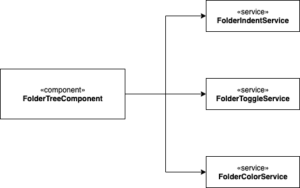
We would then have services like the following:
- FolderIndentService – which will take over the implementation of the calculateIndent method –it will calculate the indentation of the given folder depending on its nesting in the tree,
- FolderToggleService – which will take over the implementation of the expand method – It will be opening/closing the folder
- FolderColorService – which will take over the implementation of the getColorByStatus method – it will calculate the color of the folder depending on its status.
With such a subdivision, the component will only know who to ask for a given action. This makes writing unit tests for specific functionalities easier. This way, it will be possible to reuse these services (and their methods) in other places, which will translate into a reduction of possible duplicated code fragments.
Let’s look at another example.
Let’s assume we have a dialog for creating a folder. It contains a form, and a button to approve it. In addition, it also displays validation errors (e.g. the “name” field is required). Now imagine a situation where we have implemented folder editing in this component. So in one component we implement:
- folder creation,
- folder edition,
- form layer,
- data validation.
As you can see, too much is going on here as well. As a solution, we could separate 3 components like in the graphic below:
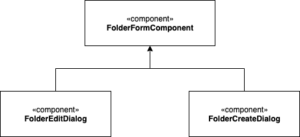
- FolderFormComponent – which would only contain the form and work on its validation.
- FolderEditDialog – which would wrap the FolderFormComponent and include the folder editing logic (e.g. sending a request to the backend).
- FolderCreateDialog – which would wrap the FolderFormComponent, but only include the logic for creating the folder.
Following features would be separated:
- creation
- edition
- presentation, data validation
This is how we make use of the Single Responsibility Principle.
In the next article, we’ll cover the Open/Closed Principle. Stay tuned 🙂