
The micro frontend architecture is a well-known development approach, and has been one for a long time. It is often compared to the widely employed microservices paradigm found commonly on the backend side of web applications.
A brief overview of micro frontend architecture
Nearly every complex application contains many different business modules. For instance, in order to create an online store, we have to create a home page, a product search result page, a checkout interface, and more.
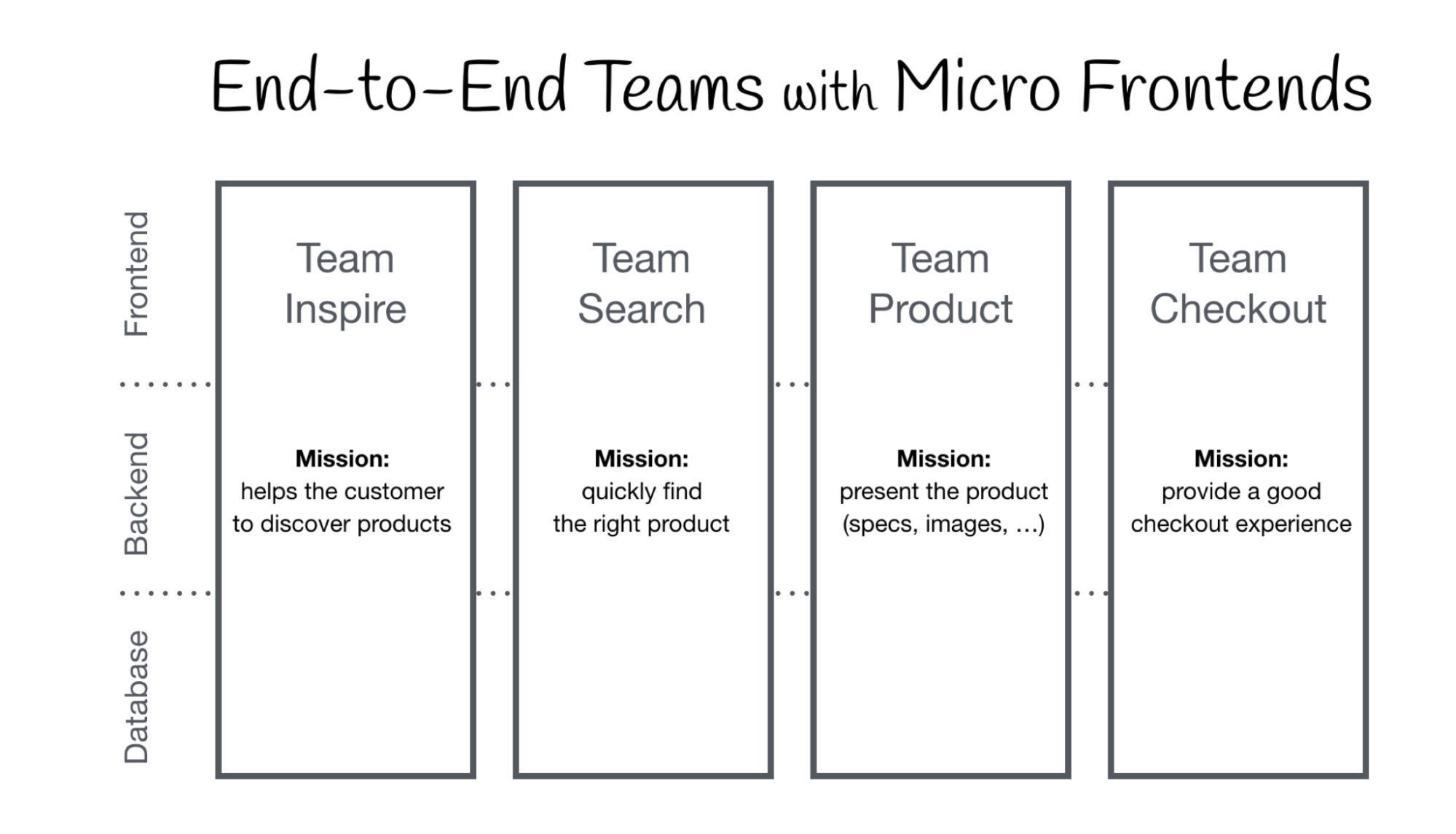
Using the micro frontend approach, our app would consist of a number of separate, smaller applications working in tandem with each other. Each module can be developed by a different team and deployed independently. Then, every discrete piece of the app — called a “remote” — is put together into a coherent whole, a “shell application” (also called a “host application”).
This approach is often employed by large corporations that operate large-scale products and services. It makes sense — each micro frontend can be commissioned as an independent product. Thus, the approach gives clients more freedom in creating robust Angular applications.
The image below illustrates a typical application utilizing a micro frontend architecture. As you can see, its component parts, the remotes, are clearly delineated and assigned to multiple independent teams.
Module Federation and Native Federation change the game
Module Federation is a feature implemented into Webpack starting with version 5. Its release kickstarted the micro frontend architecture revolution, as it provided a simple way to get started with the development approach. However, it demands our web application use Webpack — after all, that’s the tool that introduced the feature in the first place.
This isn’t an ideal situation. Most modern frontend applications use other bundlers, such as esbuild, which are much more performant than Webpack.
This is where Native Federation comes into play; it is almost the same technology. The word “almost,” however, makes all of the difference. Native Federation is build system and framework agnostic, meaning it just works with whichever tech stack you use to build your applications. It even allows you to connect to applications built in React or Vue.
Modular monolith vs micro frontend architecture
I’m sure some of you are asking the smart question — when should we use micro frontends?
Currently, many applications are built based on the nrwl/nx approach, which allows us to create multiple applications in one repository. Additionally, we often create libraries in order to reuse code in different business contexts. It sounds like the perfect approach — and the best part is, it doesn’t prevent us from using micro frontends
When should you consider micro frontends?
However, the micro frontend architecture is intended for a specific scenario. As I mentioned at the beginning of this article, micro frontends are used to build large and complex Angular applications.
The larger a system becomes, the more valuable code separation becomes. Dividing an application into discrete components lets multiple teams work in parallel without worrying about breaking the entire system. This approach is used by Allegro, the largest e-commerce company in Poland.

A good rule of thumb is that as developers, we should strongly consider using micro frontends whenever we develop an application that contains a lot of business contexts. In simpler web apps, it would simply be overkill. However, the more modules we have to develop, the more the micro frontend approach becomes the right choice.
The micro frontend architecture becomes particularly useful when our application is written using different frameworks and technologies, such as React or Vue. In those situations, however, particular attention needs to be paid to state management. Managing the state using two competing frameworks is not an easy task and requires careful consideration.
Communication between micro frontends and state management
Most web applications require some type of state management and communication between different parts of the application. The most common example is storing information about the currently logged in user.
Using modular monolith architecture, this is not a problem at all. We store tokens and user data using data-access. Then, components and interceptors can use selectors to retrieve the data they require. Simple, right?
Well, this isn’t so obvious when using micro frontends. To deal with this problem, we can create a separate library published in a private registry to store and provide data to individual microfrontends.
Let’s go back to the online store example. Adding a product to the shopping cart is a great way of demonstrating state management. Let’s assume that the product detail page and the shopping cart are separate microfrontends. When the user clicks on the “add product” button, the list of items displayed by the cart needs to be updated. Therefore, we need to figure out a method for communicating between the two micro frontends. This can be accomplished through events:
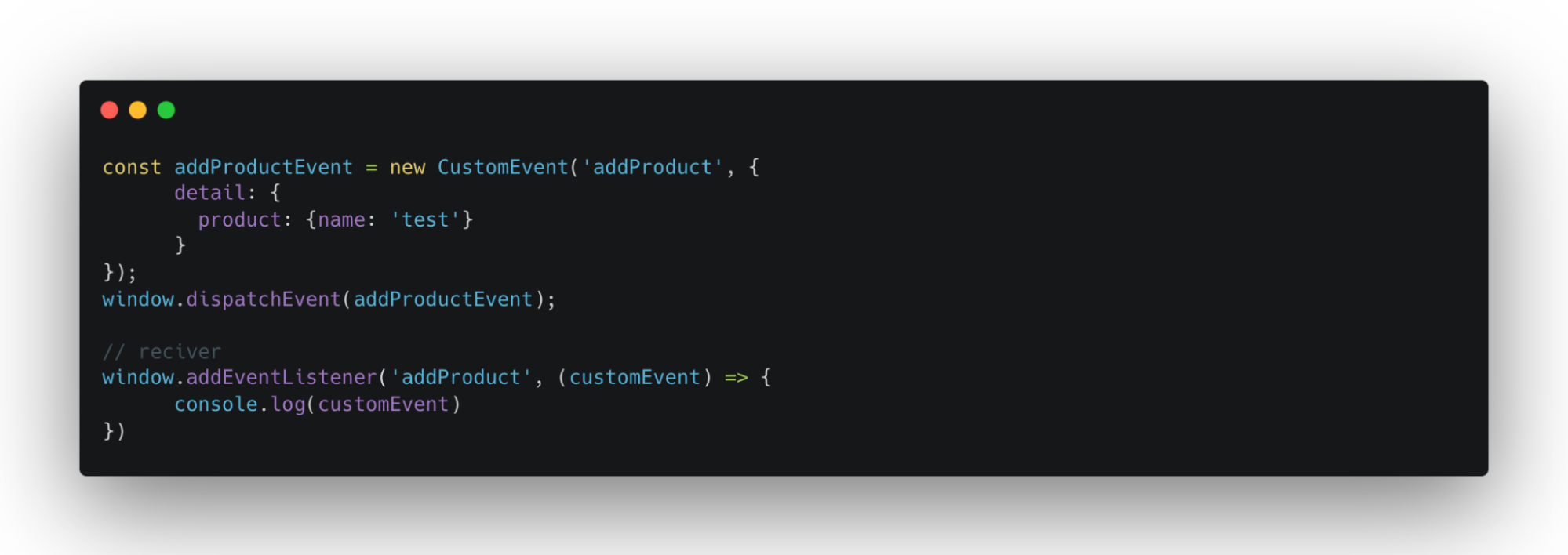
Of course, to ensure type compliance, it’s good practice to create a service that will provide a listener and methods to track events and their types. You can see a basic example below:
@Injectable({
 providedIn: 'root'
})
export class ProductEventsService {
 addProduct(): void {
   sendEvent(ProductEvents.AddProduct);
 }
}


function sendEvent(type: ProductEvents): void {
 window.addEventListener(type, (customEvent) => {
   console.log(customEvent)
 })
}


export const enum ProductEvents {
 AddProduct = 'AddProduct',
 RemoveProduct = 'RemoveProduct',
}
As you’ve no doubt noticed, this solution relies heavily on Angular. If different technologies are used to create our other micro frontends, they will obviously not be able to make use of it. It’s a good idea, therefore, to provide a plain JavaScript solution to ensure interoperability.
The risks of micro frontend architecture
One of the first things encountered by developers looking to get started with the micro frontend architecture is the high barrier to entry, especially compared to nrwl/nx.
Shared dependencies are also a common problem. An UI system created in Angular 15 may not work well within an Angular 17 application. Keeping an application up to date would require each module to be brought up to spec separately.
State management and data flow between modules also creates friction for new developers. Although events make communication relatively simple, as the application grows in complexity, it will necessarily become more difficult to debug.
Additionally, the shared libraries cannot grow infinitely. As they are subject to changes from multiple teams, the possibility of unexpected bugs is always there. Shared resources should always have their boundaries clearly defined and enforced. This, in turn, requires organizational overhead and strict discipline. Otherwise, you’ll end up in a situation like in the image below:

Micro frontend applications require more attention from devops. Every pipeline has to be configured for each micro frontend, which is time consuming. Deployments are no different. There’s a silver lining to this, however. Although the initial configuration is complex and takes some time, it ends up decreasing overall deployment times.
Micro frontend applications are larger in final size than monoliths. Thus, the infrastructure overhead associated with servers is higher.
An additional issue in micro frontend application development is sharing knowledge between individual teams. If done incorrectly, this can lead to code inconsistencies in different modules.
As programmers, we pay a lot of attention to the comfort of our work — our developer experience. Unfortunately, micro frontends disrupt DX quite often. Debugging applications becomes more complex, and frequently, we may find ourselves working across separate codebases.
Micro frontend architecture in action
Let’s create a simple application using Native Federation. It will contain only one micro frontend, but that’s enough to demonstrate dependency loading and routing.
Let’s start by creating our project without any applications. This is done by adding the -no-create-application parameter after ng new:
ng **new** native-federation-demo-app no-create-application
Next, let’s generate two applications. One will be called shell and the other will be called users.
ng generate application shell
ng generate application users
The next step will be installing Schematics, which will create the Native Federation configuration. Schematics is created by Manfred Steyer, well-known in the angular comunity. We can find the installation package under this link:
npm i @angular-architects/native-federation
At this point, it’s time configure our applications. Like we just said, Schematics does this for us. Enter these two commands:
ng g @angular-architects/native-federation:init --project users --port 4201 --type remoteng g @angular-architects/native-federation:init --project shell --port 4200 --type dynamic-hostAs you probably noticed, schematics created a new file in each application — federation.config.js. It looks like this:
const { withNativeFederation, shareAll } = require('@angular-architects/native-federation/config');


module.exports = withNativeFederation({


 shared: {
   ...shareAll({ singleton: true, strictVersion: true, requiredVersion: 'auto' }),
 },


 skip: [
   'rxjs/ajax',
   'rxjs/fetch',
   'rxjs/testing',
   'rxjs/webSocket',
   // Add further packages you don't need at runtime
 ]


});
In the shared object we can define which dependencies the micro frontend wants to share with others. For example, if we use Ngrx, we can share it with another micro frontend — this optimizes our dependency loading. The skip array, in turn, defines which dependencies cannot be shared.
You may have also noticed the singleton, strictVersion and requiredVersion properties. The singleton option set to true will cause the dependency version to be loaded only once, at the start of our application.
StrictVersion forces the use of only one version of a dependency. If we use angular material version 17.0.0 in one micro frontend and 17.1.0 in another, the application will not work properly if strictVersion is set to true. If we change the value of this parameter to false, the application will simply notify us that we’re using different versions in the console.
The requiredVersion parameter sets the range of versions that can be used in a given micro frontend. This can be a range, such as Angular 16.1 to Angular 17.1, or it can be set to auto, in which case Native Federation will figure out the appropriate versions by itself.
The federation.manifest.json file is responsible for defining micro frontends in the shell application.
{
 "users": "http://localhost:4201/remoteEntry.json"
}
Our remote configuration looks like this:
const { withNativeFederation, shareAll } = require('@angular-architects/native-federation/config');


module.exports = withNativeFederation({


 name: 'users',


 exposes: {
   './Component': './projects/users/src/app/app.component.ts',
 },


 shared: {
   ...shareAll({ singleton: true, strictVersion: true, requiredVersion: 'auto' }),
 },


 skip: [
   'rxjs/ajax',
   'rxjs/fetch',
   'rxjs/testing',
   'rxjs/webSocket',
   // Add further packages you don't need at runtime
 ]


});
The file looks almost the same as the host application’s. In addition, it has two notable fields: name, which specifies the micro frontend’s name, and exposes — an object that specifies which components or modules the micro frontend exports.
That’s it for configuration. Let’s take care of routing next — it’s really simple.
import { Routes } from '@angular/router';
import { AppComponent } from "./app.component";
import { loadRemoteModule } from "@angular-architects/native-federation";


export const routes: Routes = [
 {
   path: '',
   component: AppComponent
 },
 {
   path: 'users',
   loadComponent: () =>
     loadRemoteModule('users', './Component').then((m) => m.AppComponent),
 },
];
It looks quite friendly, doesn’t it? At first glance, it is not significantly different from regular lazy loading. The only difference is loadRemoteModule.
How does micro frontend dependency loading look in the console?
This is what the requests look like in the network tab in the console. In the middle part we can see that dependencies such as angular-platform-browers, angular-core, rxjs etc. are loaded.
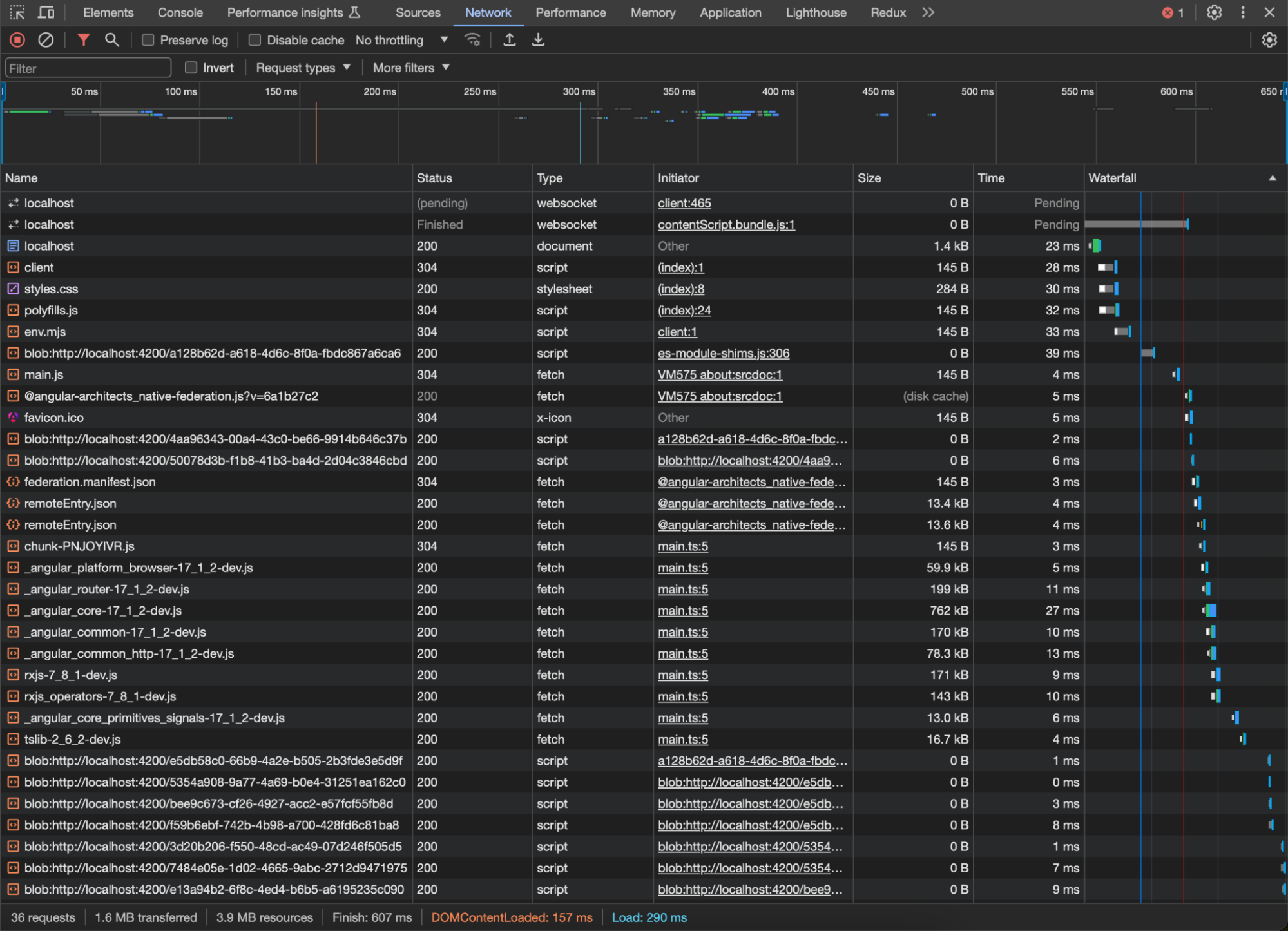
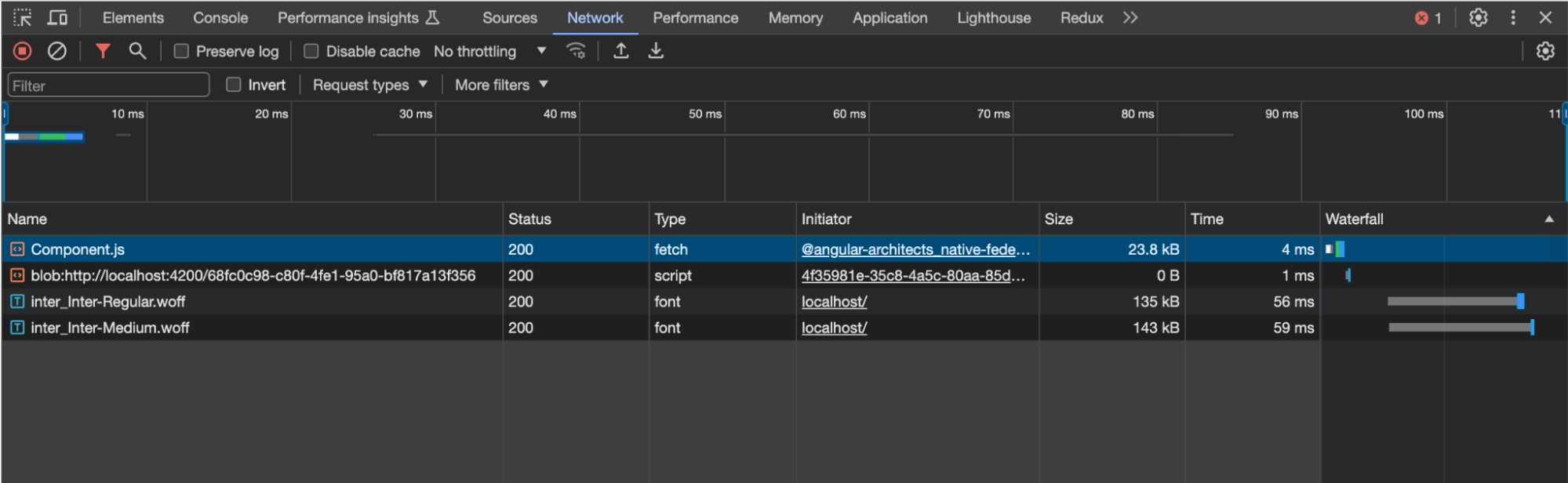
Our other application uses the same dependencies — naturally, we would like them to be shared. This happens automatically. When we go to the users micro frontend in the console, we only see the loaded component and the dependencies that the shell does not use, i.e. other fonts.
Closing thoughts
To summarize, the micro frontend architecture is not the simplest. The required knowledge provides a significant barrier to entry compared to the traditional modular monolith approach. On the other hand, micro frontends are meant for different applications and business contexts. They shine in distributed, complex systems.
Additionally, Native Federation is an appealing stack-agnostic solution that helps developers work create micro frontends without having to worry about dependency optimization.
While not every developer might require micro frontends, it’s good to at least have a cursory knowledge of how they work — after all, you can never have too many tricks up your sleeve.