
One of the challenges I faced when leveraging lazy loading feature is finding a location for the common styles (css or scss) that are specific to a module, which can then be lazy loaded at the same time as the feature module gets loaded.
One of the solutions I found from a bit of Googling was to lazy load the scss files by configuring them in angular.json and building it as a separate file. This then has to be injected to the DOM from one of the component under the feature module. You can find more about this approach in here.
This solution would work, but going through the other features provided by Angular, I found a much easier way to lazy load these styles only when the feature is loaded.
ViewEncapsulation is the feature I used additionally to lazy load the styles. It has three encapsulation strategies and None is the encapsulation strategy I used.
What is ViewEncapuslation ?
ViewEncapsulation is a setting provided to the component which decides whether the template and style defined within the component itself can affect the whole application or not.
Angular provides three active encapsulation strategies as follows:
- Emulated : Styles defined in the component are scoped only to that component without conflicting with other components. This is the default option.
- None : Do not provide any kind of encapsulation.
- ShadowDom : Uses a Shadow DOM to encapsulate styles. You can find more about ShadowDom in here.
If you are not familiar with ViewEncapuslation, you can find more about it in Angular documentation.
How ViewEncapsulation will help to lazy load common styles specific to a feature module ?
Step 1:
In order to lazy load the styles with the feature module, we can have a dumb root component where it will have the child components. If you have more than one routing in the feature module you can have that component as a base component to others.
Lets see my project structure:
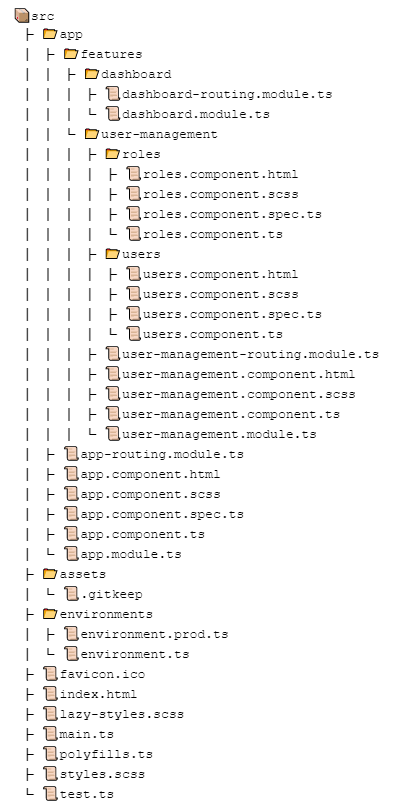
According to the above project structure, I have two feature modules.
In user-management module I have two components, users and roles. I have common styles which will be used in these two components.
I then have two separate routing for these two components in the feature module. Therefore I will be using a base component to have the common styles.
Let see the routing files:
import { NgModule } from '@angular/core';
import { Routes, RouterModule } from '@angular/router';

const routes: Routes = [
  {
    path: 'user-management',
    loadChildren: () => import('./features/user-management/user-management.module').then(m => m.UserManagementModule),
    pathMatch: 'prefix'
  },
  {
    path: 'dashboard',
    loadChildren: () => import('./features/dashboard/dashboard.module').then(m => m.DashboardModule),
    pathMatch: 'prefix'
  },
];

@NgModule({
  imports: [RouterModule.forRoot(routes)],
  exports: [RouterModule]
})
export class AppRoutingModule { }
app-routing.module.ts
import { NgModule } from '@angular/core';
import { Routes, RouterModule } from '@angular/router';
import { RolesComponent } from './roles/roles.component';
import { UserManagementComponent } from './user-management.component';
import { UsersComponent } from './users/users.component';


const routes: Routes = [
  {
    path: '',
    component: UserManagementComponent,
    children: [
      { path: 'users', component: UsersComponent },
      { path: 'roles', component: RolesComponent }
    ]
  },
];

@NgModule({
  imports: [RouterModule.forChild(routes)],
  exports: [RouterModule]
})
export class UserManagementRoutingModule { }
user-management-routing.module.ts
Step 2:
Place all the common styles specific to that feature in the relevant scss file associated with that base component.
<router-outlet></router-outlet>user-management.component.html
.card {
    border-radius: 4px;
    border: 1px solid #eee;
    background-color: #fafafa;
    height: 40px;
    width: 200px;
    margin: 0 8px 16px;
    padding: 16px;
    display: flex;
    flex-direction: row;
    justify-content: center;
    align-items: center;
    transition: all 0.2s ease-in-out;
    line-height: 24px;
  }
user-management.component.scss
As you can see, the html file only contains the router outlet. This will be used as a base component in the feature module.
Step 3:
Set the encapsulation property of that base component to ViewEncapuslation.None.
import { Component, OnInit, ViewEncapsulation } from '@angular/core';

@Component({
  selector: 'app-user-management',
  templateUrl: './user-management.component.html',
  styleUrls: ['./user-management.component.scss'],
  encapsulation: ViewEncapsulation.None
})
export class UserManagementComponent implements OnInit {

  constructor() {
  }

  ngOnInit(): void {
  }
}
user-management.component.ts
And that sums it up! ?
Following are some of my findings from using this approach:
- There’s no need to duplicate the common styles.
- Common styles specific to the feature module is loaded only when the feature is loaded.
- Less number of configurations.
- No need to manually inject the styling to the DOM.
With ViewEncapuslation set to None, these styles will be available globally once the module is lazy loaded and it might conflict with the global styles. This will happen whether you follow this way to lazy load the styles or by injecting to DOM dynamically. Hence, we need to make sure that those common style classes specific to the module are uniquely named or you can just easily wrap all the common styles specific to the module under a unique selector.
To avoid conflicts, you can also use the ShadowDom encapsulation strategy to create a separate shadow DOM. This entirely separates the component styles from the global styles but global styles which need to be applied to the feature modules won’t be applied.
With all these new strategies, you can choose the best option according to your requirements.
Summary
To lazy load the common styles specific to a feature module, you can use the ViewEncapuslation feature without manually injecting the styles to DOM. You can set the encapsulation strategy as None for the base component or root component of the feature and place all the common styles in a stylesheet linked to that component. This will make sure that styles are loaded only when the feature module is loaded.
Source code for the demo project can be found in here.
Thank you for reading and hope this would come in handy to you!
Happy lazy loading. ?