
Analog is a full-stack meta-framework for Angular. It's relatively new — its first release was in 2023 — as is the meta-framework concept in general. Many Angular developers are still finding their feet in this new context. A question then arises: what can Analog do for us? Let’s review a couple of its use cases.
Support for SSR and SSG
It is well known that Angular struggles with both static site generation and server-side rendering. The Angular Universal library helps somewhat, but it does not solve the fundamental issue. Furthermore, its implementation is difficult and it lacks many useful features — such as file-based routing, automatic TransferState, or support for ENV variables — which we can currently find in other frameworks (NextJs, SvelteKit, NuxtJS, and many others). Analog addresses this problem.
One of the many pain points with Angular’s server-side rendering is that the user side was able to experience element flicker (of text, images) when the client-side and server-side DOMs were swapped. A hydration technique was added in Angular 16 to leave the server-side components in place while the client-side application was bootstrapped. This partially solved the flickering problem, but it is still imperfect.
What's Analog's take on this?
It certainly helps that Analog has SSR enabled by default (we can also turn it off), so we don't have to worry about implementation. It doesn't cause the content flickering described above. There is also another interesting feature — a new way of route rendering.
By default, the / route is re-rendered when building the application, in order to generate HTML files faster and deliver the main page earlier. Other paths to specific sub-pages and components can also be specified. Route redrawing can be performed asynchronously. Just set the static flag to true to trigger the redrawing of static pages only (SSG). Below is an example code snippet in which we set paths to four static pages.
import { defineConfig } from 'vite';
import analog from '@analogjs/platform';

// https://vitejs.dev/config/
export default defineConfig(({ mode }) => ({
  plugins: [
    analog({
      static: true,
      prerender: {
        routes: async () => [
          '/',
          '/about',
          '/blog',
          '/blog/posts/2023-02-01-my-first-post',
        ],
      },
    }),
  ],
}));
However, that’s not all about SSR support. Analog also provides a number of plug-ins for various platforms. This enables, for instance, the integration of Angular components with Astro infrastructure — a framework that allows the creation of fast, efficient, and interactive sites using the aforementioned SSR and SSG techniques.
File-based routing
Analog uses a file layout to create file-based routing: each file will be interpreted as a route. When you create a new project, Analog creates a folder named pages. It contains files with the extension .page.ts — every such file will be mapped to a path in routing. Note that these files must be exported by default and that they will all be lazy-loaded.
What's more, you can define as many as five routing types in a particular folder:
indexed — follows the use of a file name enclosed in parentheses: src/app/pages/(home).page.ts
This type of routing causes the path to omit the enclosed segment. In this case, the home fragment is omitted, and the routing path looks like this: /
This form of routing also works with folders enclosed in parentheses:
src/
└── app/
    └── pages/
        └── (auth)/
            ├── login.page.ts
            └── signup.page.ts
In the above case, the paths will look like /login and /signup, instead of /auth/login or /auth/signup.
static — using the filename without the round brackets
src/app/pages/home.page.ts — here the path will look like this: /home
It is also possible to define nested static routes in two different ways (both ways define the path /about/home) :
src/app/pages/about/home.page.ts
src/app/pages/about.home.page.ts
dynamic — paths are defined using a file name enclosed in square brackets, which is also an index of a specific file. This parameter is called a slug parameter.
src/app/pages/products/[productId].page.ts — defines /products/:productId
It is also possible to use the dot syntax — src/app/pages/products.[productId].page.ts
If we add the withComponentInputBinding() function in the providers section of appConfig, we can use the Input decorator to take a parameter from the path, provided that both the parameter and the Input have the same name.
export const appConfig: ApplicationConfig = {
  providers: [
   	provideFileRouter(withComponentInputBinding()),
    ],
};

// src/app/pages/products/[productId].page.ts
@Component({
  standalone: true,
  template: `
    ID: {{ productId }}
  `,
})
export default class ProductDetailsPageComponent {
  @Input() productId: string;
}
layout — the routing is defined by using the same name for the parent file and the child folder
src/
└── app/
    └── pages/
        ├── products/
        │   ├── [productId].page.ts
        │   └── (products-list).page.ts
        └── products.page.ts
This will ensure that the files in the products folder will be under the /products path.
The src/app/pages/products.page.ts file contains the parent page containing the router-outlet.
src/
└── app/
    └── pages/
        ├── (auth)/
        │   ├── login.page.ts
        │   └── signup.page.ts
        └── (auth).page.ts
Here, you can also use segment skipping, with the src/app/pages/(auth).page.ts component having a router-outlet.
catch-all — used for unidentified paths (/**), for instance to handle a 404 error. For this purpose, use the file spread operative in square brackets — src/app/pages/[…page-not-found].page.ts
Vite/Vitest/Playwright support
Vite is a tool similar to Webpack. Unlike Webpack, however, Vite uses esbuild for the bundling process, which is much more efficient and many times faster, as we can see in the image below.
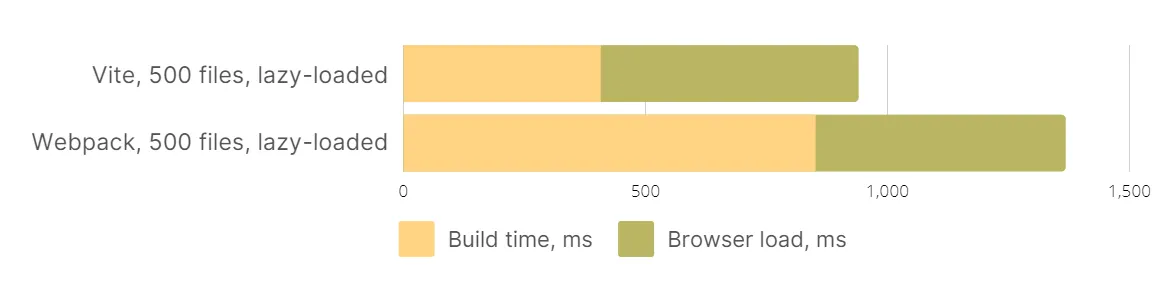
In addition, Vite splits the code into parts by default and downloads only the necessary dependencies, resulting in a much smaller processed JS file. For instance, Vite lazy-loads dependencies and a mat-table component will only be loaded when you access a subpage containing that module rather than immediately after building the entire application.
ViTest is a native platform designed for software testing. It is part of the Vite family, making Vite’s plugins and configuration compatible with both the application and the tests. ViTest includes support for the most popular web tools, such as TypeScript, JSX, UI frameworks, and provides fast unit tests. It is compatible with Jest, includes all Cypress and WebdriverIO logic, and enhances Web Test Runner or uvu. It is not dependent on programming languages.
Playwright is a set of libraries designed for writing automated tests. It has been supported by Microsoft since 2020. It uses the Auto-waiting method by default, it waits for relevant elements on the page before taking any action. Its selectors can refer to Shadow DOM elements. Supports TypeScript, JavaScript, Python, .NET, Java languages.
Markdown support
Another of Analog's many advantages is the ability to capture Markdown files in the rendering process. In addition, you can use them as routing paths and generate their content as separate pages.
Markdown is a markup language (f.ex. another one is HTML) for creating text files with styles. It’s intended to provide access to styling text, such as headings or paragraphs without the user needing to learn HTML or CSS.
Example of Markdown file:
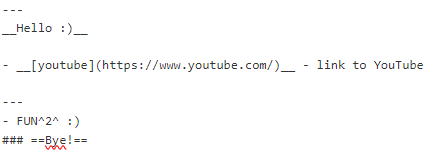

Markdown files placed in the src folder will be automatically downloaded and rendered after the routing is defined.
In order to render Markdown using Analog, we need to do several things:
-
In the providers array of the app.config.ts file, enable rendering of markdown files using the provideContent() and withMarkdownRenderer() functions.
import { ApplicationConfig } from '@angular/core'; import { provideContent, withMarkdownRenderer } from '@analogjs/content'; export const appConfig: ApplicationConfig = { providers: [ provideContent(withMarkdownRenderer()), ], }; -
Place the file in the src/app/pages folder with an .md extension, e.g. src/app/pages/example.md
-
Retrieve the content and display it in the template using the MarkdownComponent provider, the injectContent() function, and the <analog-markdown></analog-markdown> component.
/src/app/pages/blog/posts.[slug].page.ts import { injectContent, MarkdownComponent } from '@analogjs/content'; import { AsyncPipe, NgIf } from '@angular/common'; import { Component } from '@angular/core'; export interface PostAttributes { title: string; slug: string; description: string; coverImage: string; } @Component({ standalone: true, imports: [MarkdownComponent, AsyncPipe, NgIf], template: ` <ng-container *ngIf="post$ | async as post"> <h1>{{ post.attributes.title }}</h1> <analog-markdown [content]="post.content"></analog-markdown> </ng-container> `, }) export default class BlogPostComponent { readonly post$ = injectContent<PostAttributes>(); }The component knows where to fetch the file's contents because it gets this information from the routing path /src/app/pages/blog/posts.[slug].page.ts
Summary
In summary, Analog has many modern features that make the job of site development easier and faster. It tries to make the best use of server-side rendering and static site generation, provides an easy way to use markdown files, automates routing creation, simplifies test writing, and uses the latest bundler. Analog is starting to develop and that's certainly not all it has to offer developers.